Skip to content

Security and governance

Set who sees each record and how each form field behaves.

Beezr controls access by application, module, record and field, through roles and permission profiles you set. Field permissions control what each person sees and edits on forms. Sign-in can run through your company’s identity provider with a second factor, and sensitive fields can be encrypted with keys you name.

Designer · Access Manager
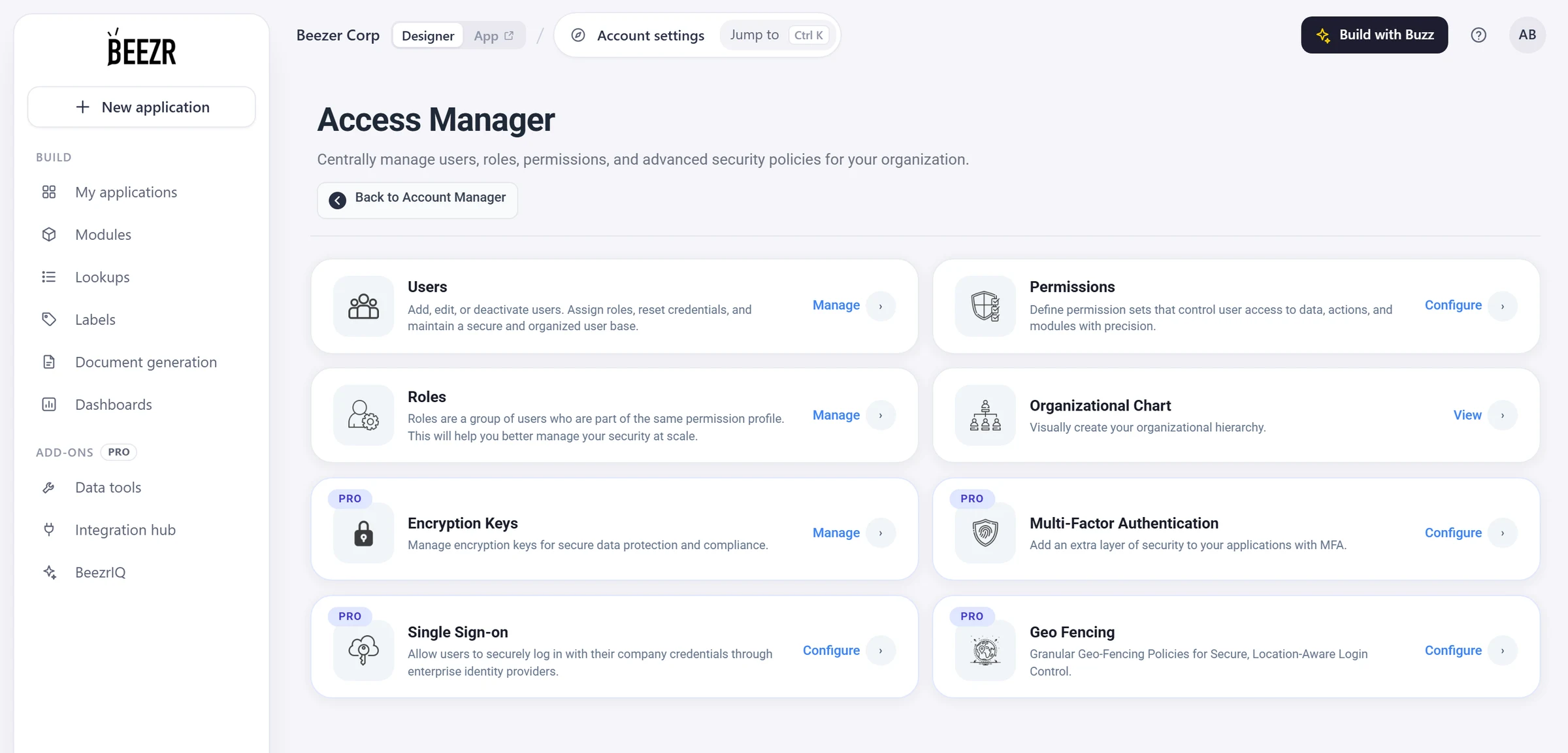
The Beezr Access Manager: cards for users, roles, permissions and the organizational chart, then encryption keys, multi-factor authentication, single sign-on and geo fencing, each marked PRO.
  1. 1
    Users and roles

    People belong to roles. A role is a group of users who share one permission profile.

  2. 2
    Permissions

    A profile says which applications, modules, records and form fields a role can reach.

  3. 3
    Organizational chart

    Draw who reports to whom. A profile can let people see the records of their team.

  4. 4
    Beezr Shield

    Encryption keys, multi-factor sign-in, single sign-on and geo fencing. Each carries a PRO badge.

Access is set at four levels

A permission profile works at four levels. It says which applications people can open, what they can do in each module, which records they can reach and how each field behaves on a form. Read it left to right: each level narrows the one before it.

Permission profiles, in one grid

A profile is a single page. Tick the applications people can open, then work down the modules: view, create, edit, delete, then the fields and records they can reach. Changes apply the next time people with that profile sign in.

  • AppsThe applications people can open, and the one that opens first.
  • ModulesView, create, edit and delete, module by module.
  • Fields and recordsFields editable, read-only or hidden on forms. Record access follows the rules you choose.

Full access is a switch on the profile. It sees every record in every permitted module, skips the record rules and can delete anything, so give it sparingly.

Designer · Permission profile
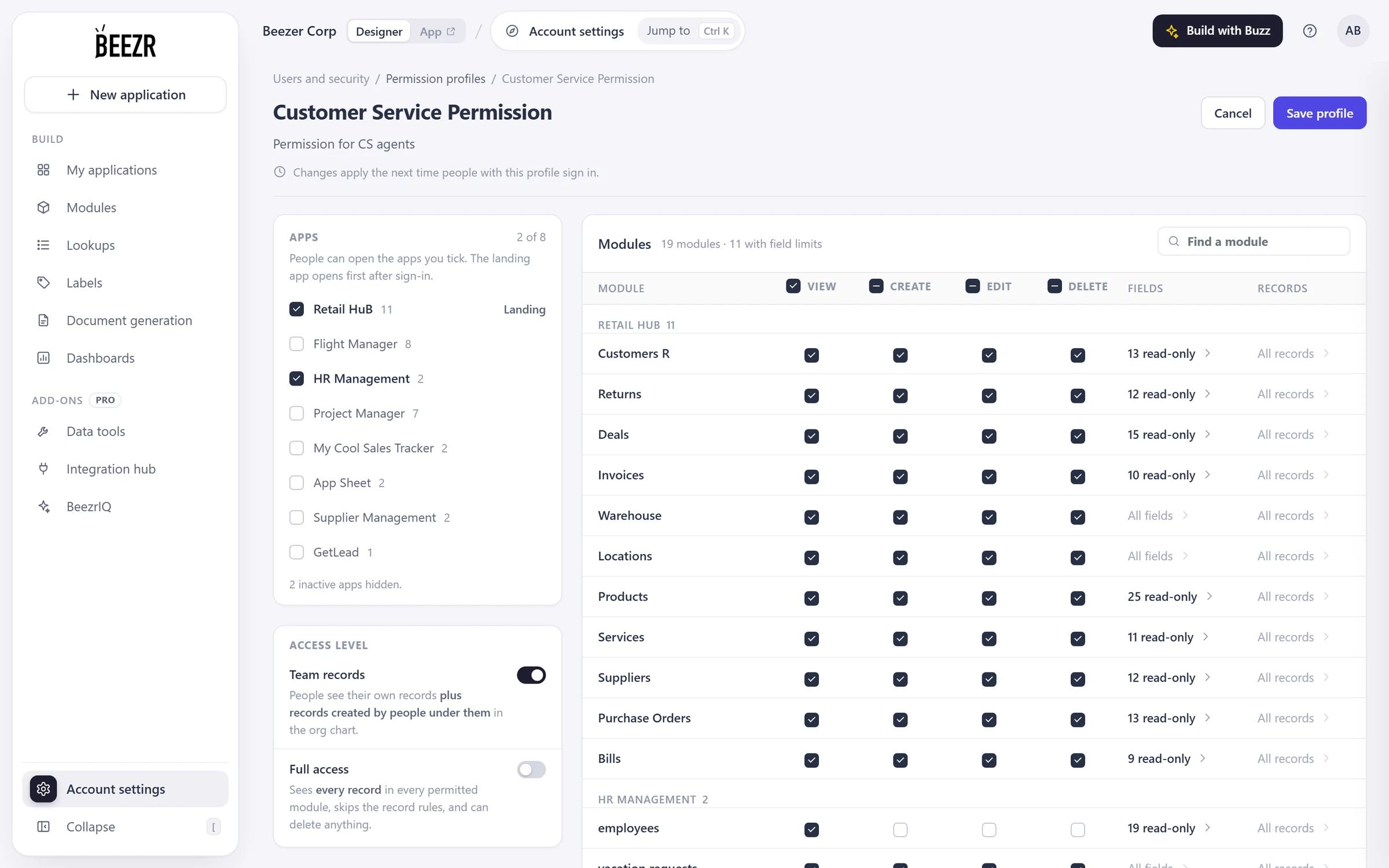
A permission profile in the Beezr Designer: the apps people can open, with one marked as the landing app; an access level with team records and full access switches; and a grid of modules with view, create, edit and delete checkboxes, the number of read-only fields and the record rules.
  1. 1
    Apps

    Tick the applications this profile can open. One is the landing app, the one that opens first after sign-in.

  2. 2
    Access level

    Team records adds the records of people under the user on the org chart. Full access skips the record rules.

  3. 3
    View, create, edit, delete

    What people can do in each module, one row per module.

  4. 4
    Fields and records

    How many fields are read-only on forms, and the rules that determine which records people see.

Roles carry the profile

A role is a group of people who share one permission profile. Create a role, pick its profile and assign users. People take the access of their role, so a change to the profile reaches everyone in it.

  • CreateA role with a name and a description.
  • ChooseThe permission profile the role uses.
  • AssignThe users who hold the role.
Designer · Roles Manager
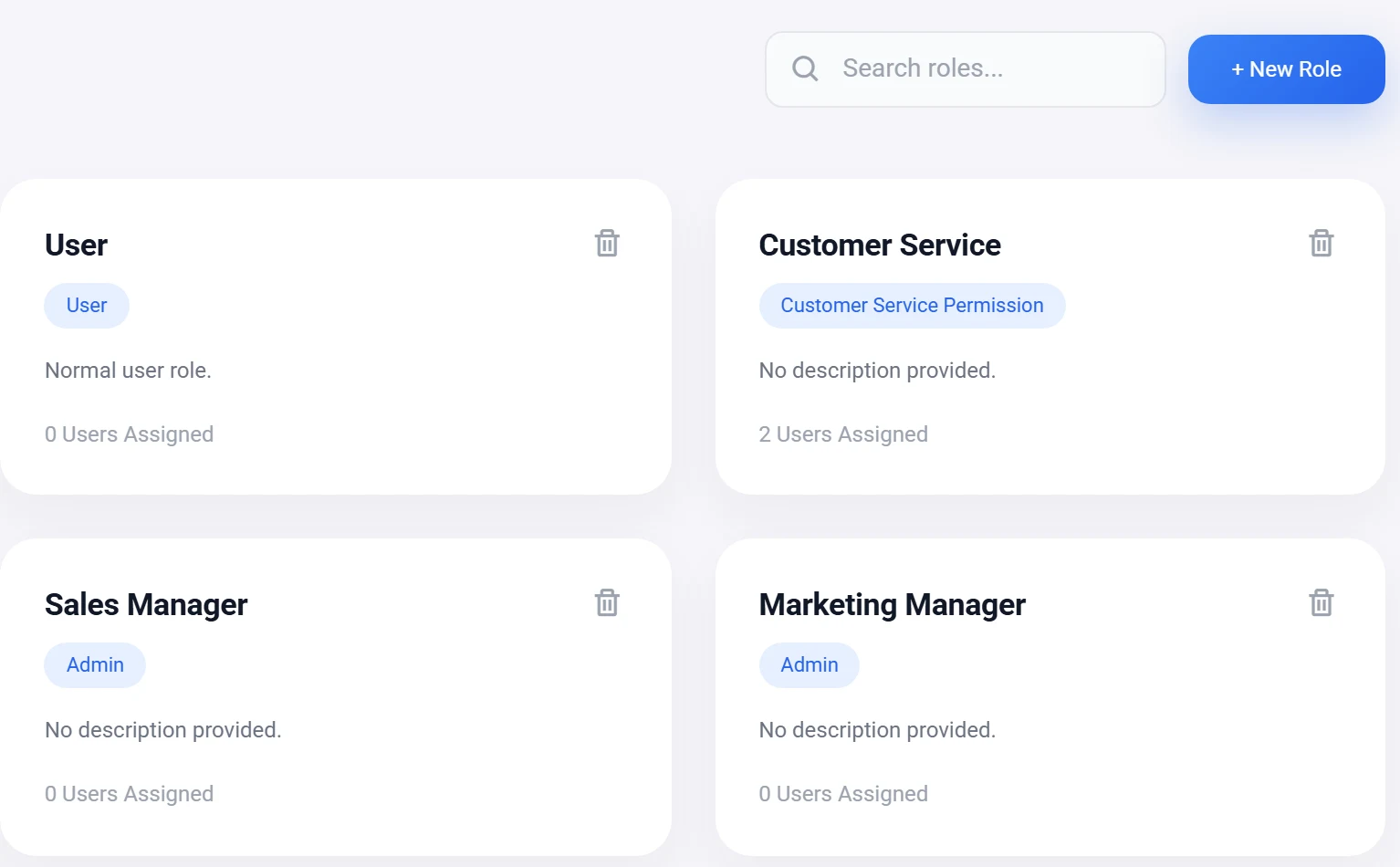
The Beezr Roles Manager: a card for each role showing the permission profile it uses and the number of users assigned, with a New Role button.
  1. 1
    One profile per role

    The chip names the permission profile the role uses.

  2. 2
    Who is in it

    Each card shows how many users are assigned.

Record visibility that can follow your org chart

Draw your organisation as a chart of roles. A profile can then switch on team records: people see their own records plus the records created by people under them on the chart.

  • The chartA tree of roles that you draw in the Designer.
  • The switchTeam records, in the Access level of a permission profile.
Designer · Org chart
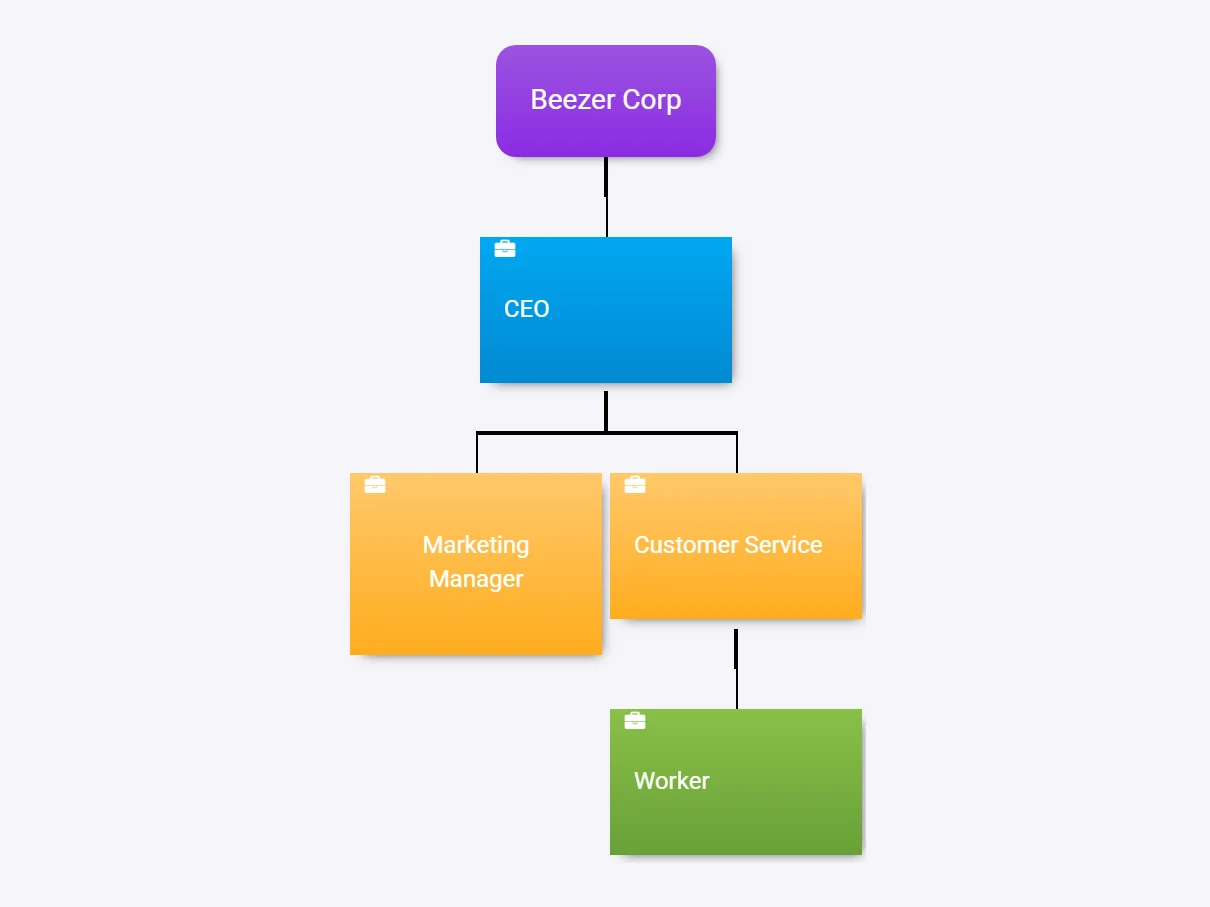
The Beezr organizational chart: an organisation box at the top, a CEO role below it, two roles under the CEO and a Worker role under one of them.
  1. 1
    The top

    Your organisation, or a division of it.

  2. 2
    A role

    Each box is a role from the Roles Manager.

  3. 3
    Under another role

    Placed below it, so it counts as under it for team records.

Beezr Shield

Four controls for teams that need more than roles and permissions: field encryption, single sign-on, multi-factor sign-in and geo fencing. They are sold together as Beezr Shield, and each carries a PRO badge in the Access Manager.

Field encryption

Switch on Encrypt values for a field and pick one of your keys. You name the keys, and you decide which fields they protect.

  • KeysNamed by you, listed as active or archived.
  • Per fieldValues are encrypted at rest, field by field.
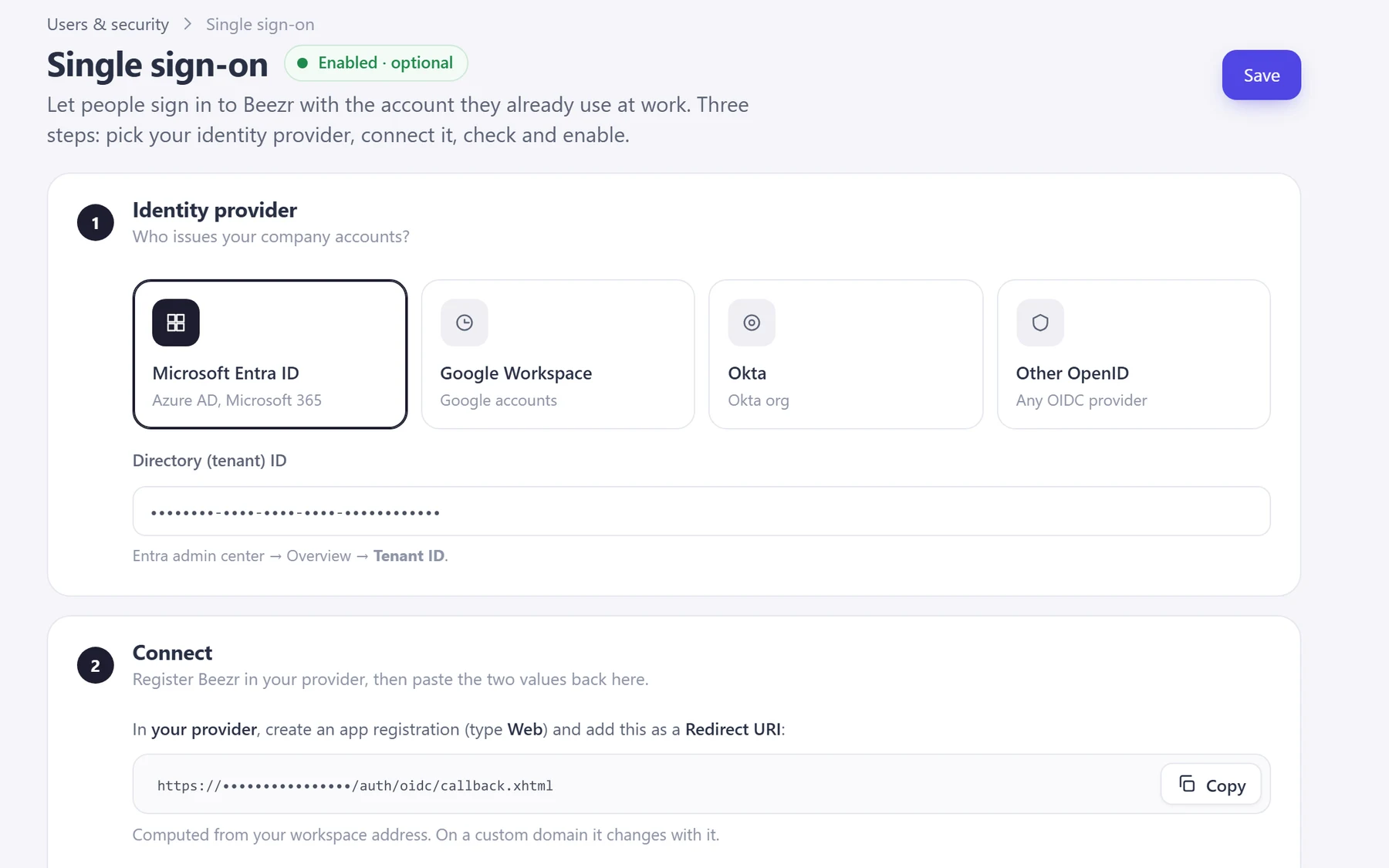
The top of the Beezr single sign-on setup. Step one offers Microsoft Entra ID, Google Workspace, Okta and Other OpenID, with a field for the tenant ID. Step two begins with the redirect URI. Identifiers are masked.

Single sign-on

People sign in with the account they already use at work. Pick your identity provider, connect it, check it and enable it.

  • ProvidersMicrosoft Entra ID, Google Workspace, Okta, or any OpenID Connect provider.
  • SecretThe client secret is stored encrypted. Identifiers are masked in this capture.

Multi-factor sign-in

After the password, people enter a one-time code sent to their email. You set how it behaves.

  • The code4, 6 or 8 digits, valid for 3, 5, 10 or 15 minutes, with 3, 5 or 10 attempts.
  • WhoYou choose the user groups it applies to, for example super administrators or people who use the Designer.
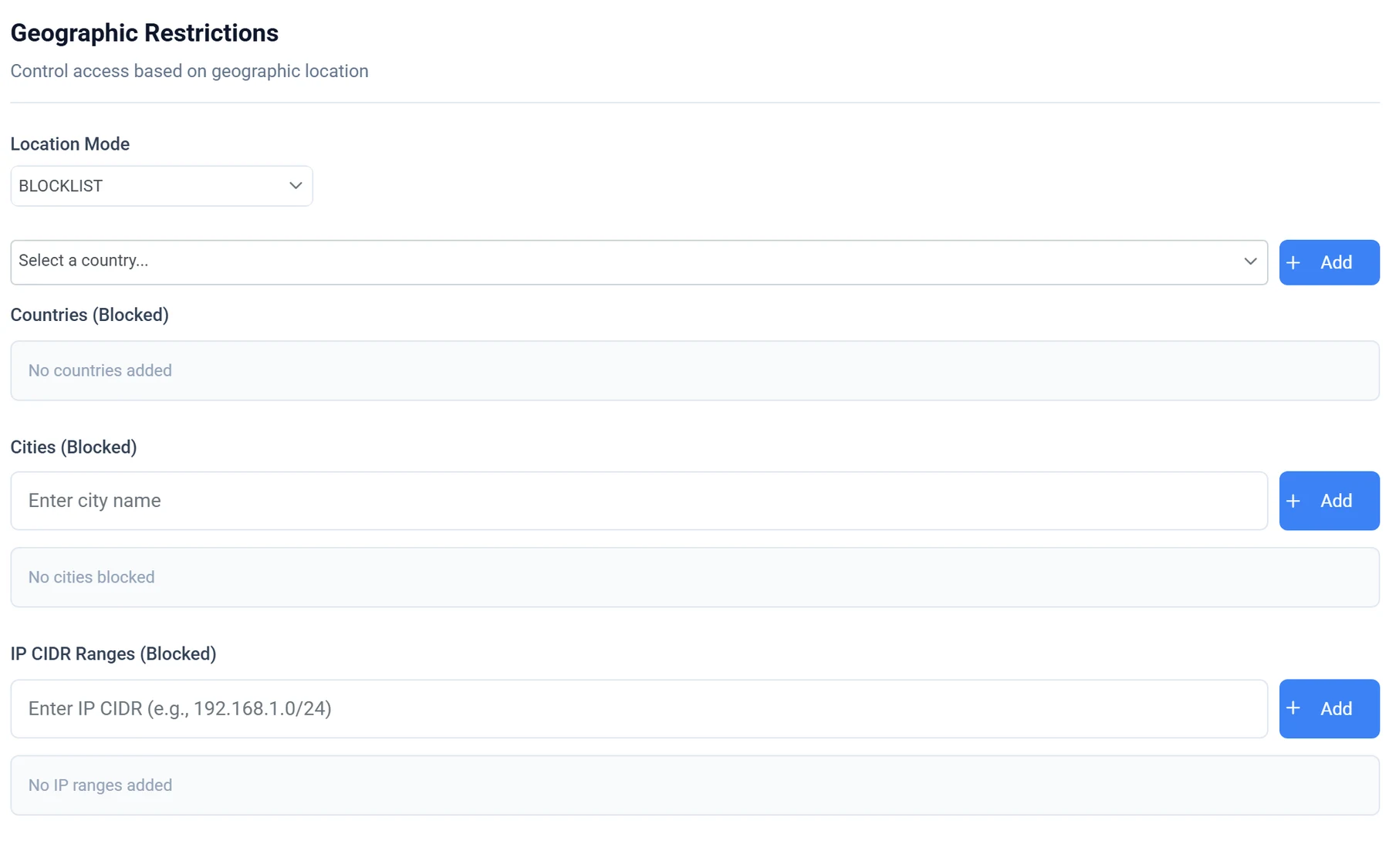
The Location tab of a new geofence policy in the Beezr Designer: a blocklist location mode, with fields to add countries, cities and IP CIDR ranges.

Geo fencing

Allow or deny sign-in by where it comes from. A policy has a priority, a schedule and the users or roles it applies to.

  • WhereCountries, cities, networks (ASN) and IP ranges, as an allow list or a block list.
  • SignalsVPN, Tor and hosting-provider traffic.
  • ModeEnforce a policy, or run it in monitor mode.

Build in the sandbox, promote when it is ready

Switch to the sandbox in the Designer and change what you like. Promote your selected changes when they are ready for users. Compute a diff, see each item as added, modified or deleted, choose what goes, and promote. Beezr flags conflicts, keeps an audit trail and can roll a promotion back.

Promoted

  • Modules
  • Fields
  • Lookup lists and values
  • Forms
  • Workflows
  • Smart views
Designer · Sandbox promotion
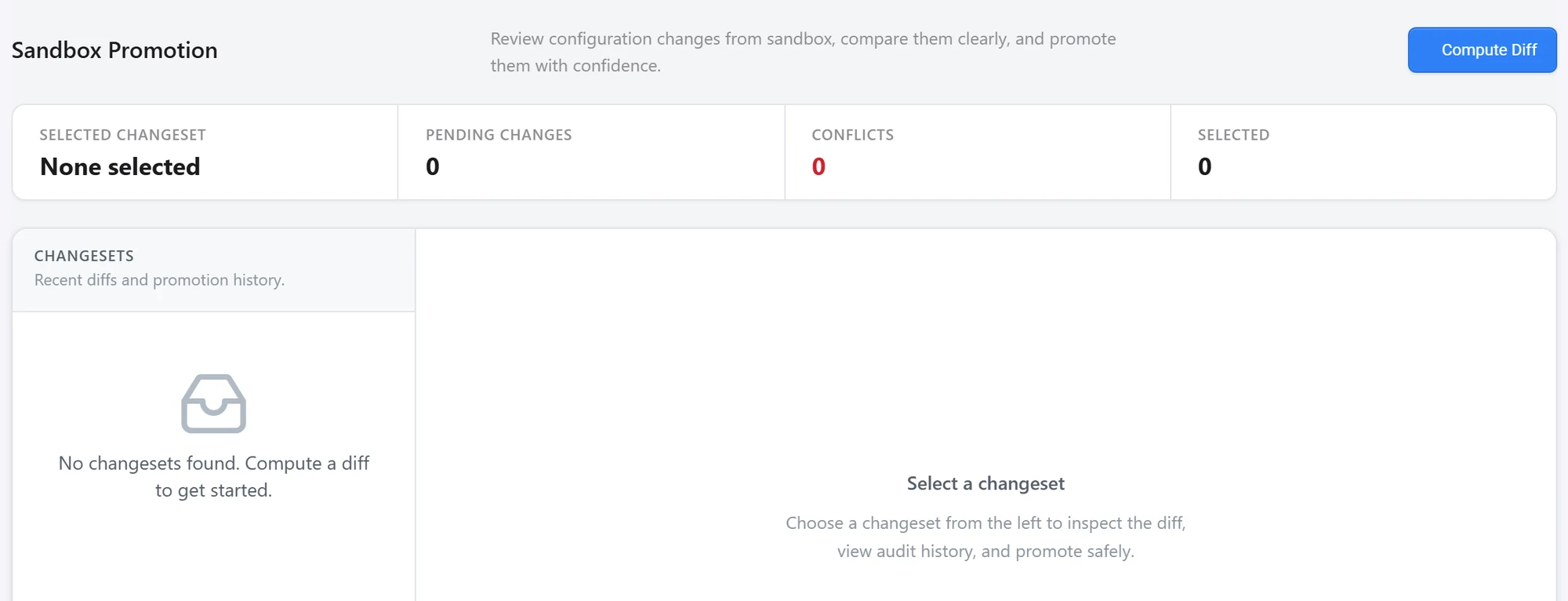
The Beezr Sandbox Promotion page: a Compute Diff button, counters for pending changes, conflicts and selected items, and the changeset list.
  1. 1
    Compute diff

    Compares the sandbox with production and lists what changed.

  2. 2
    Conflicts

    Counted next to pending and selected changes, before you promote.

  3. 3
    Changesets

    Recent diffs and the promotion history.

Record history, and the trail around it

Beezr keeps the history a review asks about first: who created a record, who approved it, what a workflow did and what was promoted. It is kept where the work happens.

App · Record history
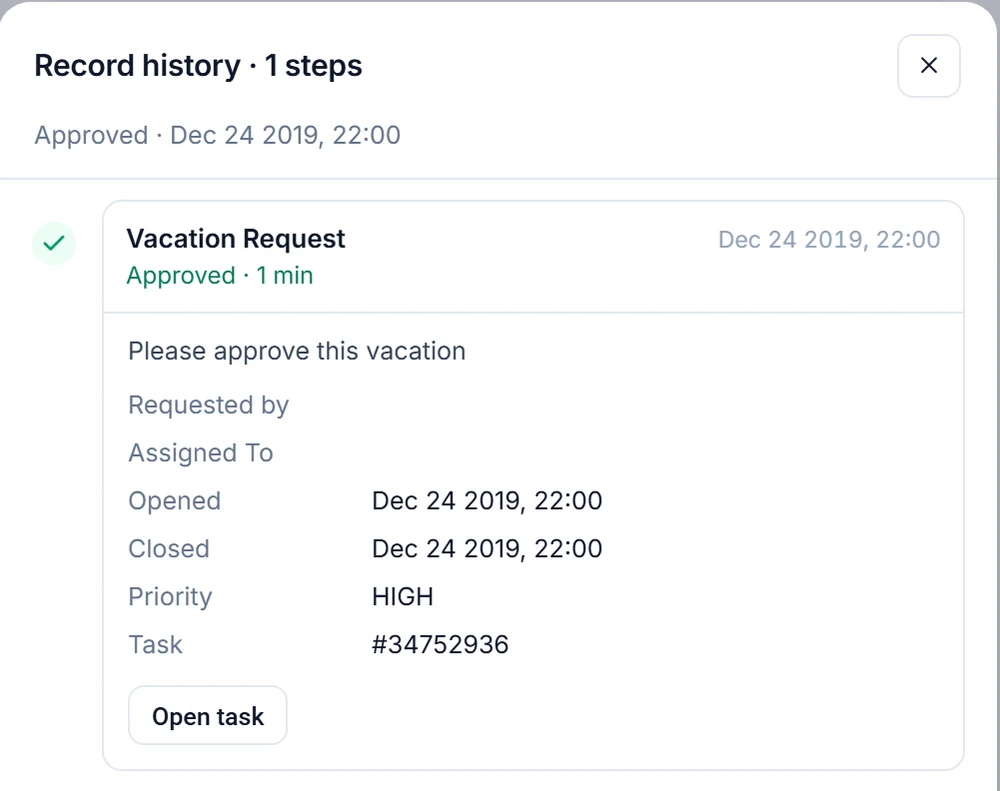
The record history drawer on a record in a Beezr application: one approved vacation request step with its requester and assignee fields, opened and closed times, priority, task number and an Open task button.
  1. 1
    On the record

    Record history opens from the record and lists its approval steps.

  2. 2
    Who and when

    Requester, assignee, opened, closed, priority and task. Names are masked in this capture.

  3. 3
    Open task

    Jumps to the task behind the step.

On every record

Who created it and when.

Value changes

A lookup field has a Track value changes setting. When it is on, old and new values appear in the record history.

Workflow runs

Every run with its steps logged, and a step-by-step debugger.

Workflows and approvals
Promotions

A promoted sandbox changeset keeps an audit trail and can be rolled back.

One form, three profiles

Choose a profile and see how the same contract form changes.

Illustration of a Beezr setup. Profile names, fields and values are examples.

ContractContracts formSave
CONTR-00003
Facilities management
Active
EGP 4,200,000.00
Net 30
Recreated from the Designer for clarity

What the Buyer profile sets

Six fields on the form. Five are shown, one is hidden.

  • Contract NumberRead-only
  • TitleEditable
  • StatusRead-only
  • Contract ValueEditable
  • Payment TermsEditable
  • Retention PercentageHidden
ContractContracts formSave
CONTR-00003
Facilities management
Active
EGP 4,200,000.00
Net 30
Recreated from the Designer for clarity

What the Approver profile sets

Six fields on the form. Five are shown, all read-only, and one is hidden.

  • Contract NumberRead-only
  • TitleRead-only
  • StatusRead-only
  • Contract ValueRead-only
  • Payment TermsRead-only
  • Retention PercentageHidden
ContractContracts formSave
CONTR-00003
Facilities management
Active
EGP 4,200,000.00
Net 30
5
Recreated from the Designer for clarity

What the Finance profile sets

Six fields on the form, all shown. Three can be edited.

  • Contract NumberRead-only
  • TitleRead-only
  • StatusRead-only
  • Contract ValueEditable
  • Payment TermsEditable
  • Retention PercentageEditable

For your security review

Each capability, how it works, and whether it comes with the platform or belongs to Beezr Shield.

CapabilityHow it worksAvailability
Access
Application accessPermission profiles list the applications people can open, and which one opens first.Included in the platform
Module accessView, create, edit and delete are set per module. Profiles also say who can create and view reports.Included in the platform
Record rulesRecord rules choose which records people can access in each module. A profile can add team records: records created by people under the user on the org chart.Included in the platform
Form field permissionsEach field is editable, read-only or hidden on the forms in the application. New fields start as editable.Included in the platform
Roles and org chartPeople take the permission profile of their role. The org chart is a chart of roles that you draw.Included in the platform
Sign-in and data protection
Single sign-onOpenID Connect with Microsoft Entra ID, Google Workspace, Okta or any OpenID Connect provider. The client secret is stored encrypted.Part of Beezr Shield
Multi-factor sign-inA one-time code by email. You set its length, how long it lasts, how many attempts people get and which user groups it applies to.Part of Beezr Shield
Geo fencingAllow or deny sign-in by country, city, network, IP range, VPN or Tor signal, for the users or roles you pick. Enforce a policy or run it in monitor mode.Part of Beezr Shield
Field encryptionThe values of a field are encrypted at rest with a key you name.Part of Beezr Shield
Sign-in rate limitsRepeated failed sign-ins from one address are limited, and so are one-time code attempts.Included in the platform
Change control and records
Sandbox to productionChangesets with an item-level diff, conflict detection, an audit trail and rollback, for modules, fields, lookups, forms, workflows and smart views.Included in the platform
Record historyWho created a record and when, the approval history on the record, and old and new values for lookup fields that track changes.Included in the platform
Workflow run historyEvery run with its steps logged, and a step-by-step debugger.Included in the platform

How it connects

The same permission profiles connect access across the platform.

Data

Profiles are set per module and per field on forms. A field added later starts as editable.

Data and interfaces
Workflows

An approval task can go to everyone in a role. Workflows are among the items you promote from the sandbox.

Workflows and approvals
Reports

A profile says who can create and view reports, and a dashboard page can be assigned to roles.

Reports and dashboards
Integration

Other systems call in with an API key, one per system, that you can pause. A secured webhook needs the key too.

Integration

In a customer’s words

The Beezr team met our expectations and helped make the transition smooth. The support personnel has been very helpful and always available when needed to help us to fix issues, useful system which help our clients to get the high quality and cost reduction which they need.

Photo of Waleed NimrWaleed NimrCOO

Questions people ask

How is access controlled in Beezr?

Through permission profiles. A profile says which applications people can open, what they can do in each module, which records they can reach and how each field behaves on a form. Roles carry the profile, so people take the access of their role. Changes apply the next time people with that profile sign in.

Can we sign in with our company’s identity provider?

Yes, through OpenID Connect: Microsoft Entra ID, Google Workspace, Okta or any provider that speaks OpenID Connect. Single sign-on is part of Beezr Shield.

What second factor does sign-in support?

A one-time code sent by email. You choose the code length, how long it lasts, how many attempts people get and which user groups it applies to. Multi-factor sign-in is part of Beezr Shield.

What is Beezr Shield?

Beezr Shield is the name for four controls sold together: field encryption with keys you name, single sign-on, multi-factor sign-in and geo fencing. Each carries a PRO badge in the Access Manager. Roles, permission profiles, record rules, the org chart and sandbox promotion are part of the platform.

Can we restrict sign-in by country or network?

Yes, with geo fencing. A policy allows or denies sign-in by country, city, network, IP range or VPN and Tor signals, for the users or roles you pick. Run it in enforce mode, or in monitor mode. Geo fencing is part of Beezr Shield.

How do changes move from the sandbox to production?

You make changes in the sandbox, compute a diff, choose the items to promote and promote them. Modules, fields, lookups, forms, workflows and smart views are covered. Beezr flags conflicts, keeps an audit trail and can roll a promotion back.

Is there an audit log?

Beezr records who created each record, the approval history on the record, old and new values for lookup fields that track changes, workflow run history with step logs, and an audit trail for sandbox promotions.

Where Beezr runs and where your data lives →

Start with the problem in front of you.

Show us the process you are trying to improve. We will tell you whether Beezr looks like a fit and how we would approach it.

Next on the tour

Next: AI in workflows

Where AI actually helps, and who stays in charge.

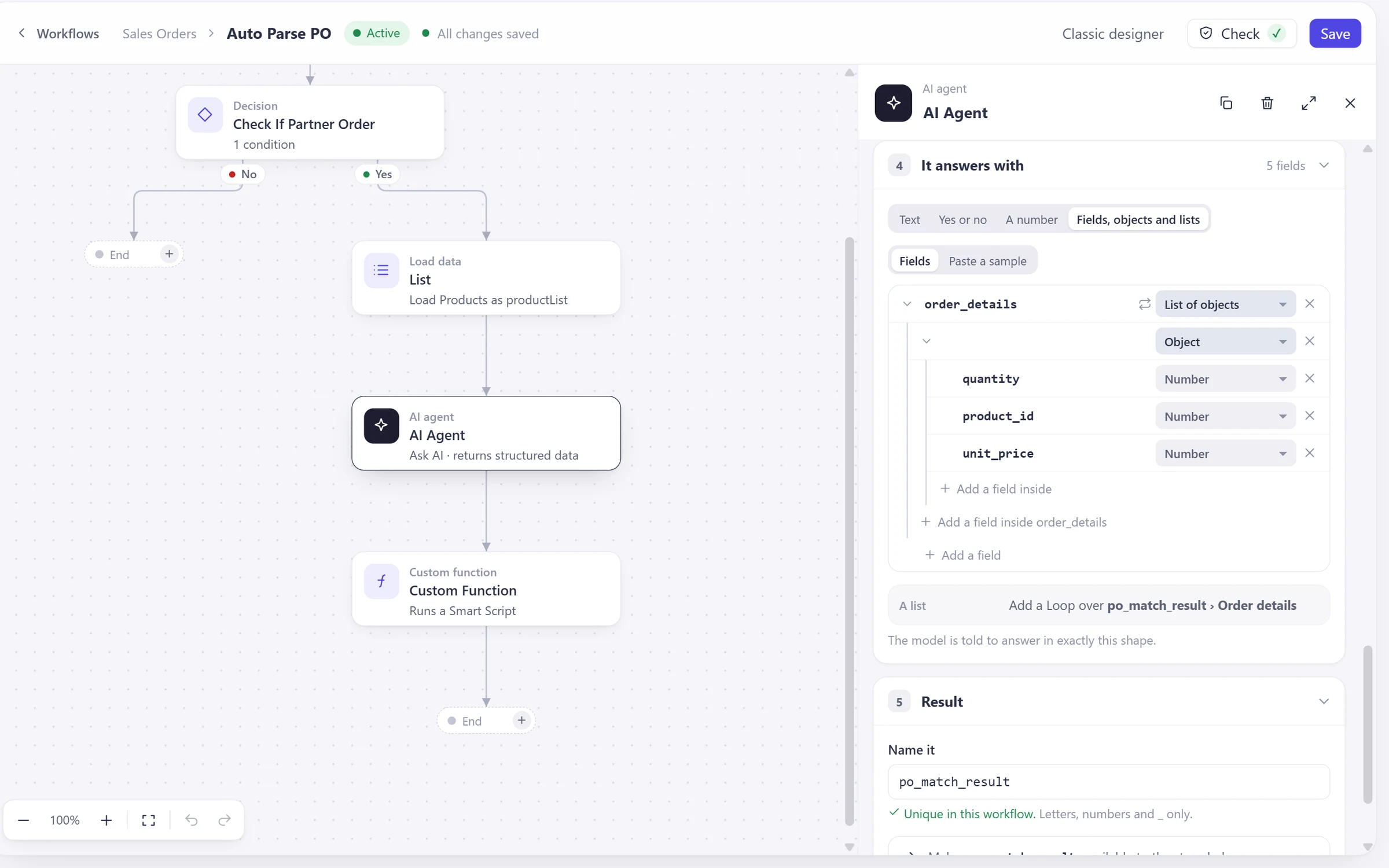
The AI agent step in a Beezr workflow, with the answer shape set to a list of order details.