Skip to content

Reports and dashboards

Ask your data a question. Put the answer where people will see it.

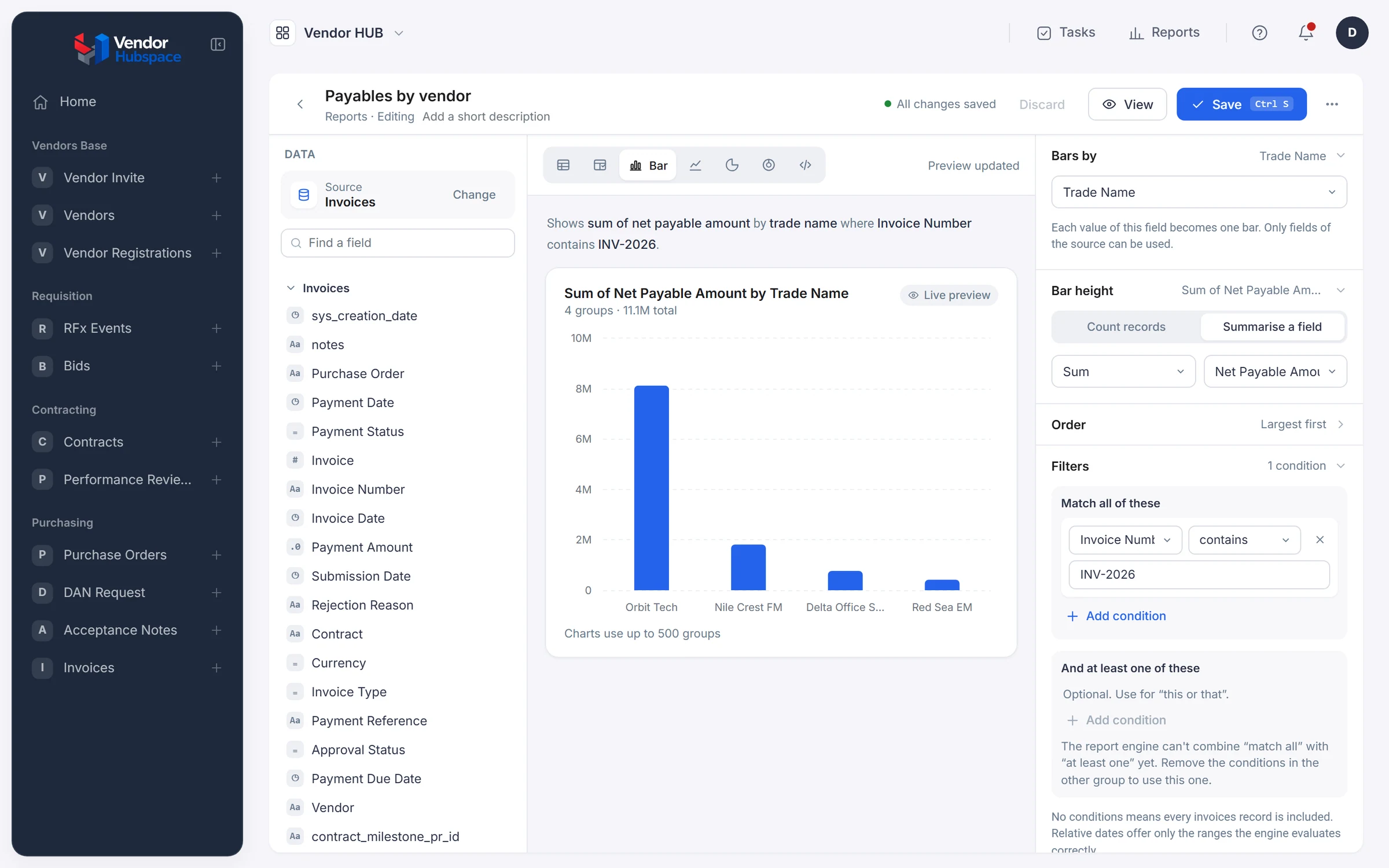
Reports in Beezr read the same records your applications use, including fields from related records, so a payables report can group by the vendor’s name without exporting anything. Build a table or a chart, filter it, save it, and place it on a dashboard for the people who need it.

Vendor HUB · Report builder
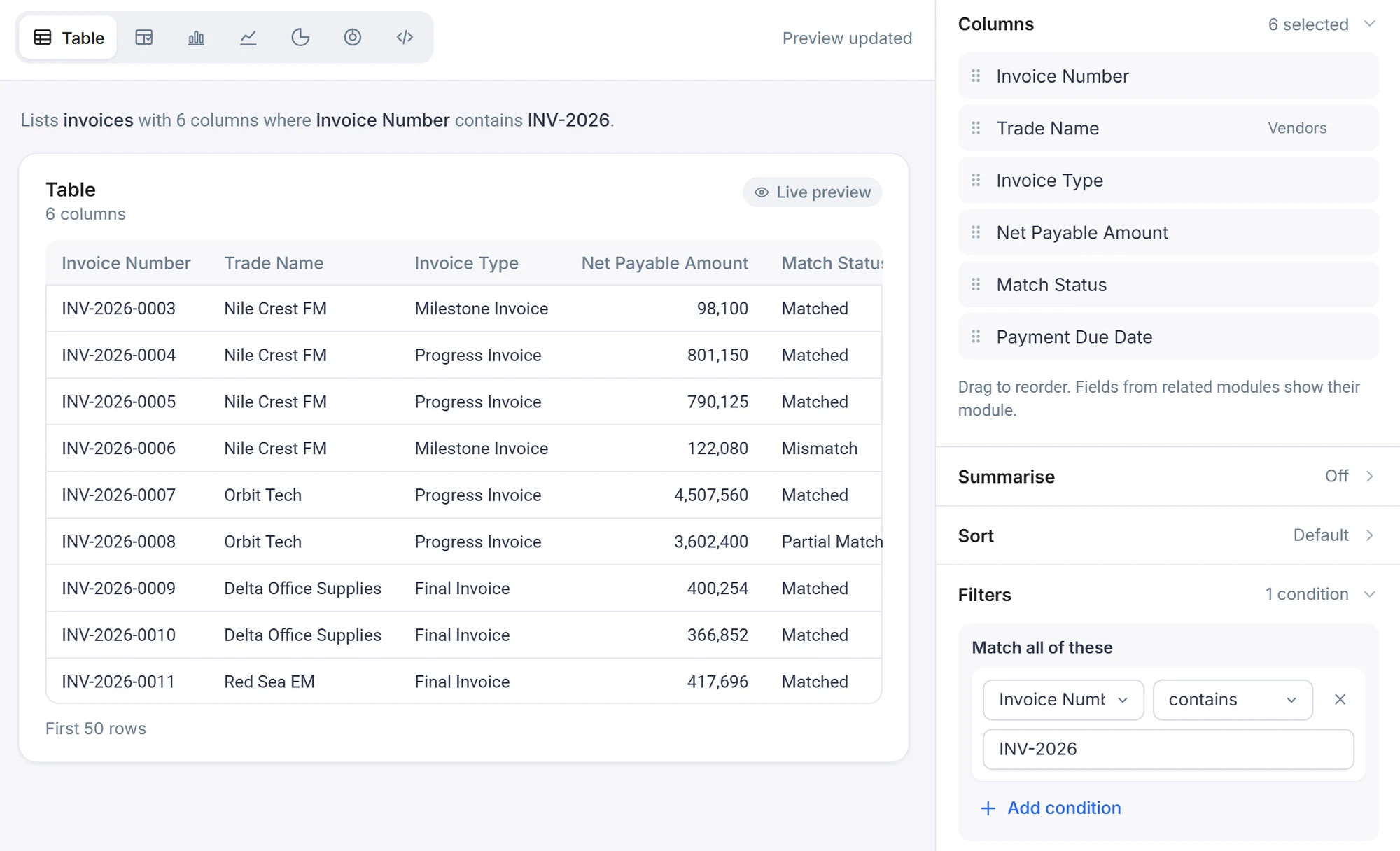
The Beezr report builder in Vendor HUB. The source is Invoices. A bar chart shows the sum of net payable amount by trade name, 11.1M in total, with the chart settings and an invoice number filter on the right.
  1. 1
    One source

    Start from a module, here Invoices. Fields from related modules sit in the same list.

  2. 2
    Seven report types

    Table, custom table, bar, line, pie, donut and custom layout.

  3. 3
    A field from another record

    Trade Name is a vendor field. The invoices are grouped by it, with nothing exported.

  4. 4
    Filters

    Match all of these. One condition keeps the 2026 invoices.

Seven kinds of report, one builder

Choose a table or a chart, then say what to show. Tables list records, and custom tables add computed columns. Bar, line, pie and donut charts group them. A custom layout is your own HTML, for the report that has to look like a document.

  • TotalsCount records, or sum, average, minimum or maximum of a field.
  • Over timeLine charts group a date field by day, month, month name or year.
  • Side by sideBar and line charts can compare two or more filtered groups.

Table

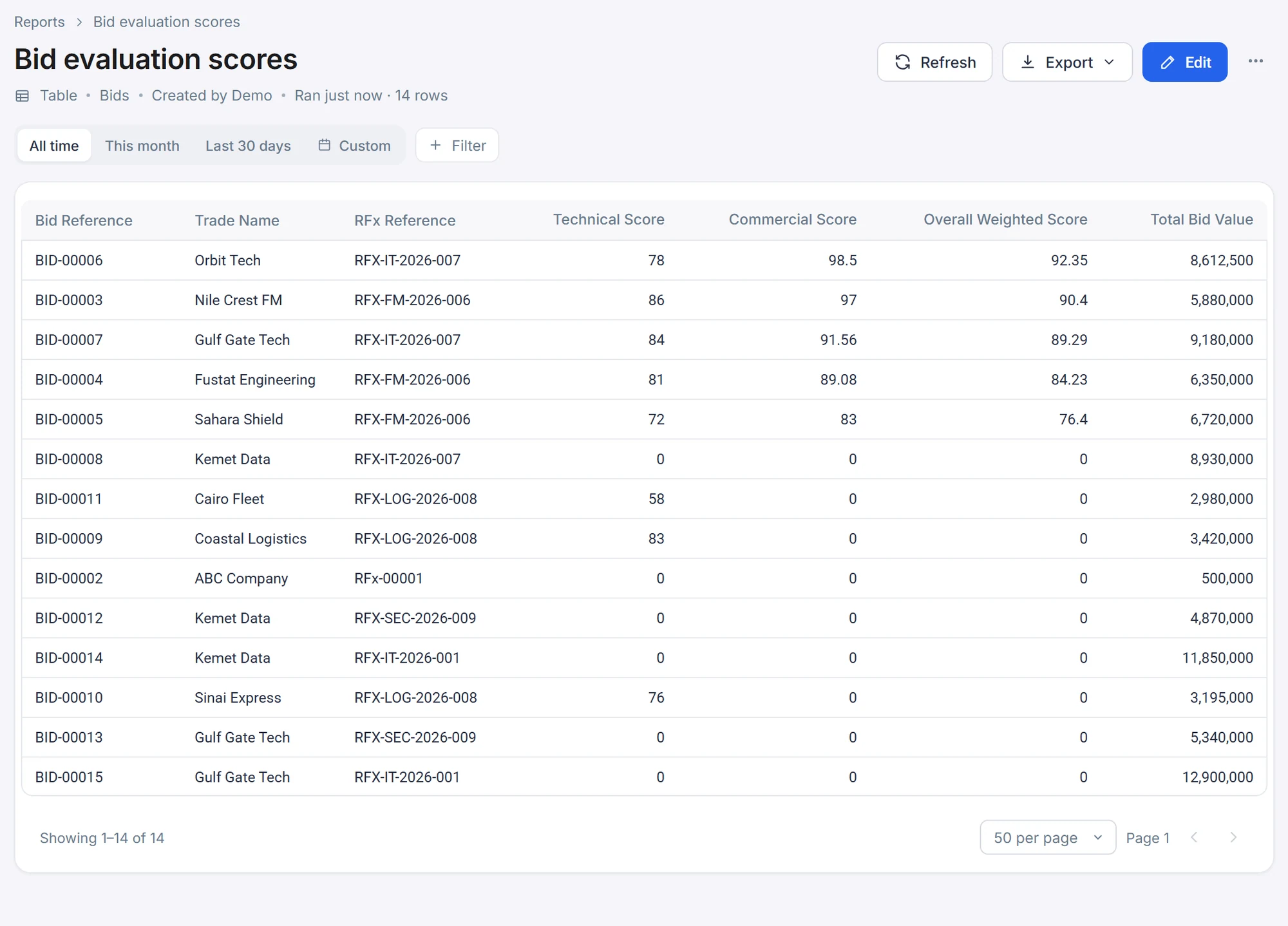
A list of records with the columns you pick, including columns from related records. Sort it, summarise it, filter it. This one lists bids, and the trade name and RFx reference come from the Vendors and RFx events modules.

Real report from Vendor HUB
Vendor HUB · Reports · Bid evaluation scores
The Bid evaluation scores report in Vendor HUB, a table of fourteen bids with trade name, RFx reference, technical, commercial and overall weighted scores and total bid value.

Custom table

A table with columns you compute. Add fields together, add a column of fixed text, and style each column. Here the last column adds the VAT to the gross amount.

Recreated from the report builder, with example values

Reports › Invoice totals

Invoice totals

Custom table · Invoices · Created by Demo · Ran just now · 4 rows

RefreshExport ⌄Edit
All timeThis monthLast 30 daysCustom+ Filter
4
Invoices · 5 columns, one computed
Invoice NumberTrade NameGross AmountVAT AmountGross + VAT
INV-2026-0008Orbit Tech3,160,000442,4003,602,400
INV-2026-0007Orbit Tech3,954,000553,5604,507,560
INV-2026-0010Delta Office Supplies321,80045,052366,852
INV-2026-0011Red Sea EM366,40051,296417,696
Recreated from the report builder for clarity. Values are examples.

Bar chart

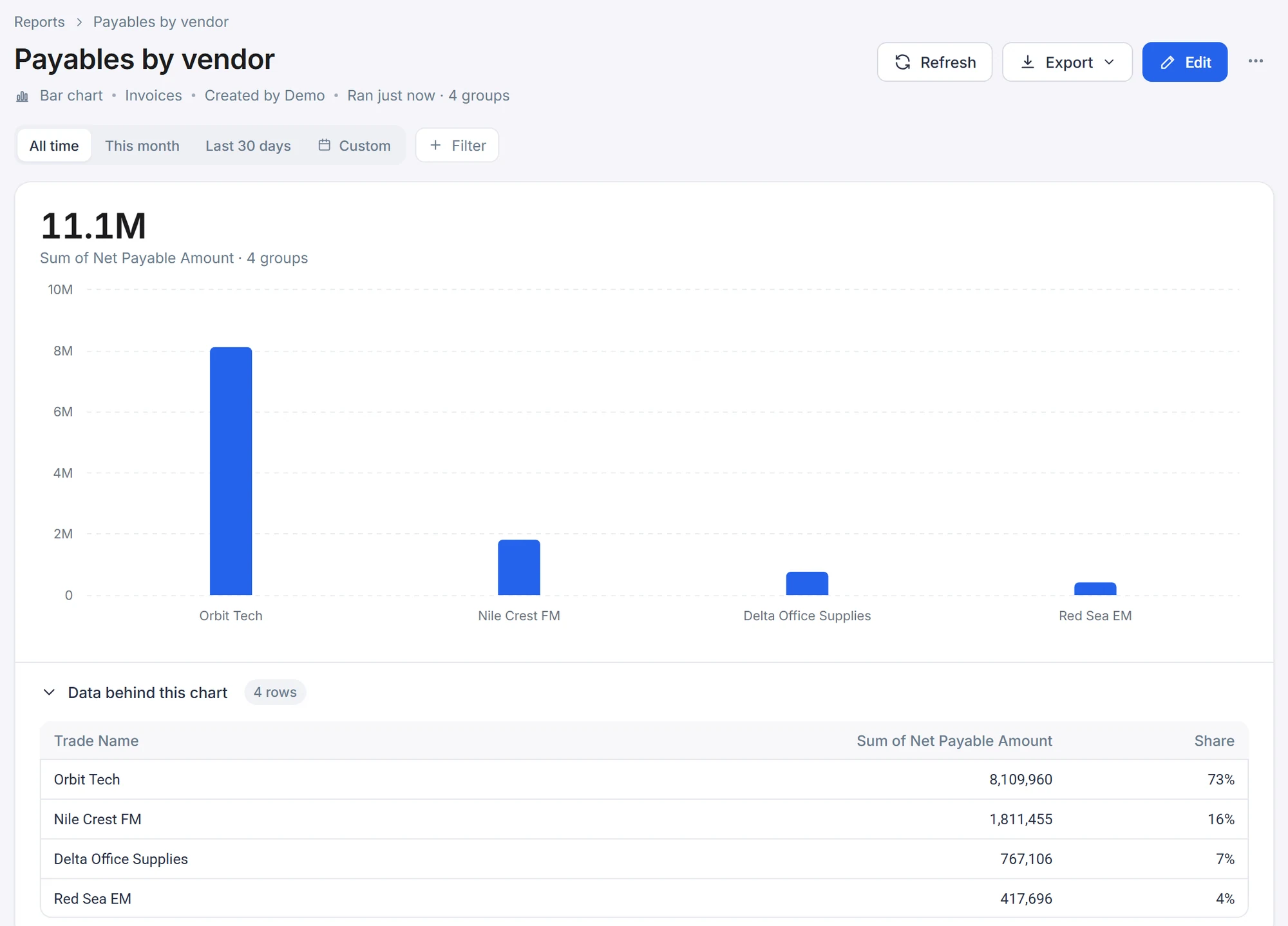
Group records by a field and show a number for each group: a count, or the sum, average, minimum or maximum of another field. Bar charts can also compare two or more filtered groups side by side.

Real report from Vendor HUB
Vendor HUB · Reports · Payables by vendor
The Payables by vendor report in Vendor HUB: a bar chart of net payable amount by trade name, 11.1M in total, with Refresh, Export and Edit buttons, date ranges, and the data behind the chart below it.

Line chart

The same idea over time. A line chart needs a date field, grouped by day, month, month name or year, and it can compare groups like a bar chart.

Recreated from the report builder, with example values

Reports › Monthly payables

Monthly payables

Line chart · Invoices · Created by Demo · Ran just now · 6 groups

RefreshExport ⌄Edit
All timeThis monthLast 30 daysCustom+ Filter
11.1M
Sum of Net Payable Amount · 6 groups
01M2M3M4M5M AprMayJunJulAugSep
Data behind this chart 6 rows
Recreated from the report builder for clarity. Values are examples.

Pie chart

Shares of a whole, grouped by any field. Here, nine invoices by match status.

Recreated from the report builder, with example values

Reports › Invoices by match status

Invoices by match status

Pie chart · Invoices · Created by Demo · Ran just now · 3 groups

RefreshExport ⌄Edit
All timeThis monthLast 30 daysCustom+ Filter
9
Count of invoices · 3 groups
Matched7 · 78%
Mismatch1 · 11%
Partial Match1 · 11%
Data behind this chart 3 rows
Recreated from the report builder for clarity. Values are examples.

Donut chart

A pie with the total in the middle. This one splits contract value by contract type, with the shares beside it and the data table underneath.

Real report from Vendor HUB
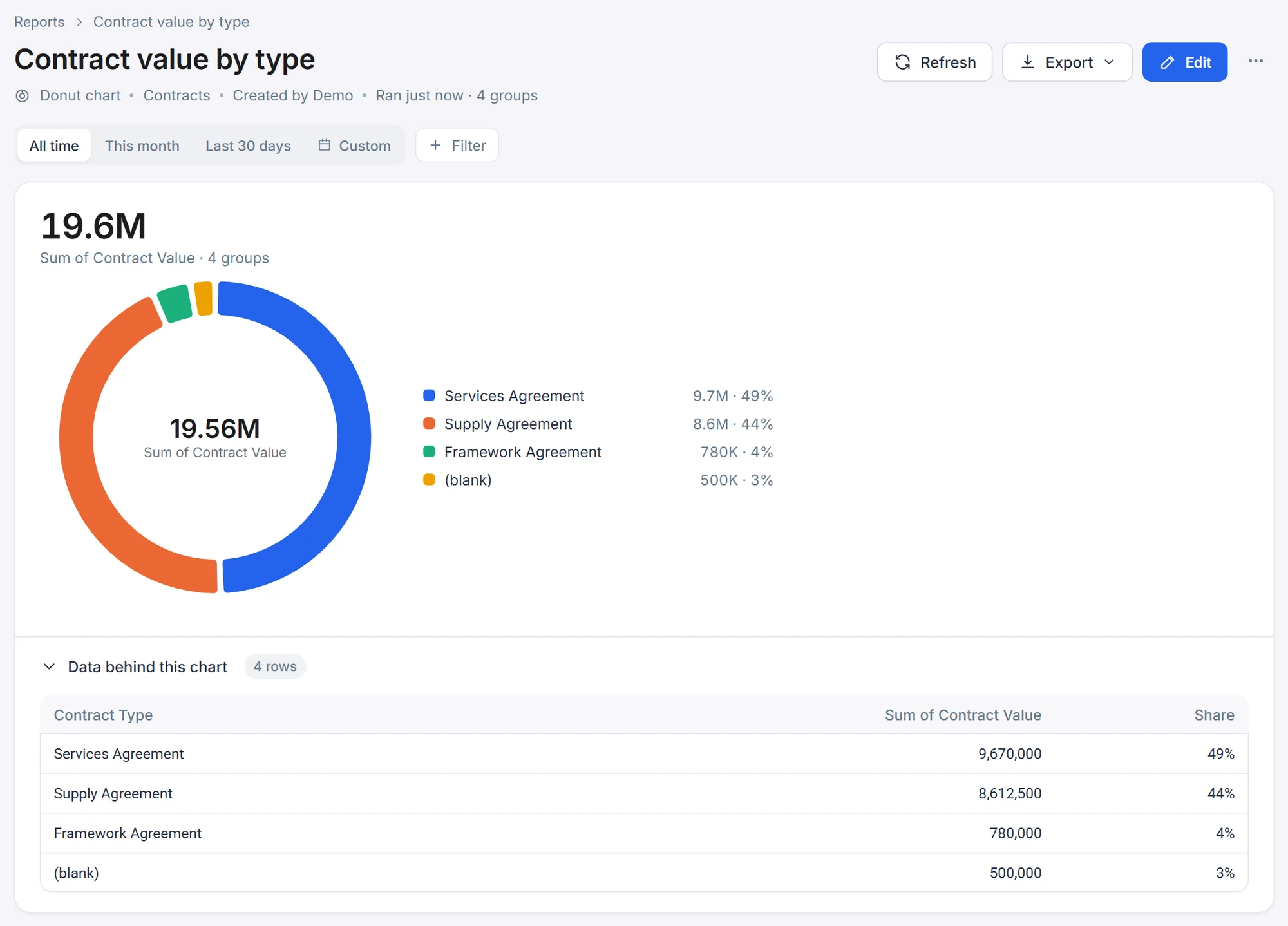
Vendor HUB · Reports · Contract value by type
The Contract value by type report in Vendor HUB: a donut chart with 19.56M in the middle and a legend of four contract types with their value and share.

Custom layout

Your own HTML with script values in it, for the report that has to look like a document.

Recreated from the report builder, with example values

Reports › Payables summary

Payables summary

Custom layout · Invoices · Created by Demo · Ran just now

RefreshExport ⌄Edit
All timeThis monthLast 30 daysCustom+ Filter
Payables summary

Your own HTML, filled with values from a script.

Unpaid invoices5
OutstandingEGP 4.98M
Paid to vendors this yearEGP 6.23M
Trade NameNet payableShare
Orbit Tech8,109,96073%
Nile Crest FM1,811,45516%
Delta Office Supplies767,1067%
Recreated from the report builder for clarity. Values are examples.

Dashboards: lay them out, then people use them

A dashboard is a page you build in sections of one to four columns. A metric block holds a number, a report block holds a saved chart or table, and a custom HTML block holds your own markup. Preview it on a desktop, tablet or phone, and choose the roles that can access a page.

  • LayoutsFull, halves, thirds, quarters, wide and narrow.
  • BlocksMetric, report and custom HTML.
  • AccessChoose which roles can access a page.
Designer · Dashboards · Main Dashboard
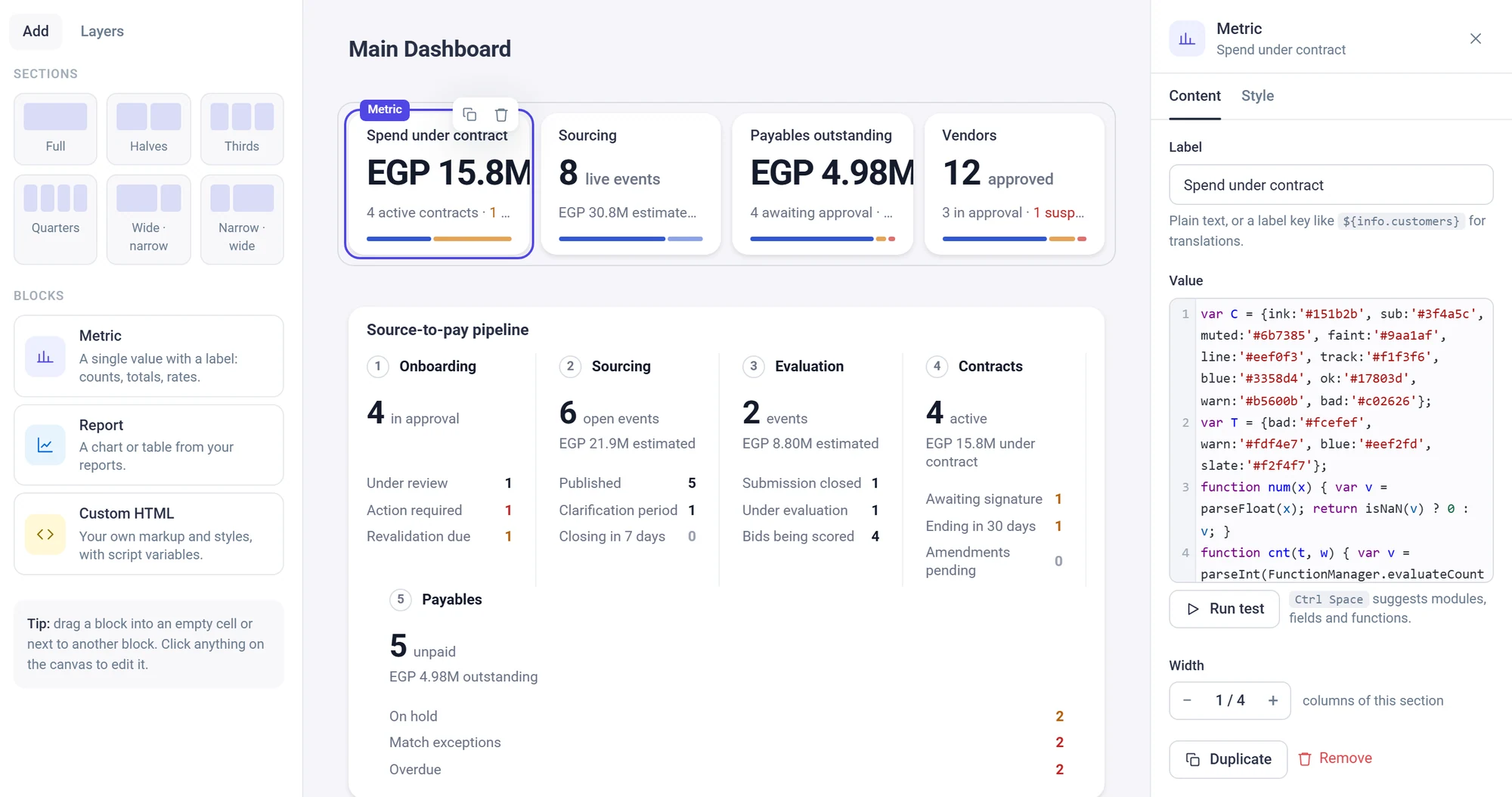
The Beezr dashboard builder for Main Dashboard. A block palette with Metric, Report and Custom HTML is on the left. The Spend under contract metric card is selected, with its script in the panel on the right.
Vendor HUB · Home
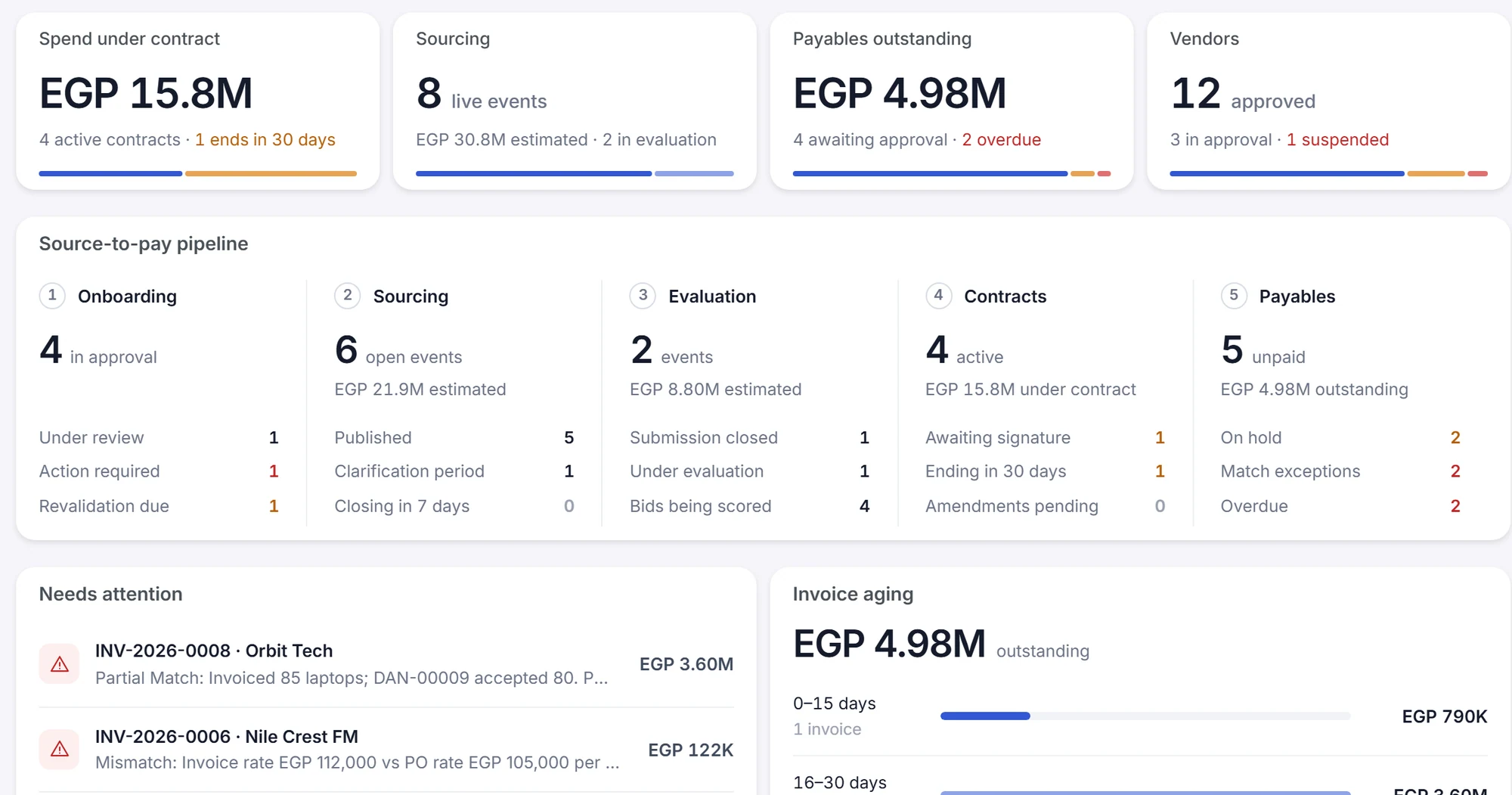
The Vendor HUB home dashboard: four metric cards, the source-to-pay pipeline across five stages, and the Needs attention list.

Configure: the dashboard page in the Designer. A block palette on the left, the Main Dashboard canvas in the middle, and the selected metric’s settings and script on the right.

See: the same page as the team opens it in Vendor HUB, with the numbers filled in from the records.

A number you write in Smart Script

A metric block’s value is a Smart Script: JavaScript that reads your records and returns what the card shows. Sums, counts and averages use the same functions that run inside workflows, so a number on a dashboard and a rule in a workflow agree.

  • ReadsSum, average and count over any module, with a clause you write.
  • ReturnsA number, a sentence, or HTML for a richer card.
  • TestsA Run test button sits under the editor.
Metric block · Value
var inForce = "WHERE contracts.end_date >= NOW()";
var value = FunctionManager.evaluateSumFunction(
    "contract_value", "contracts", inForce);
var n = FunctionManager.evaluateCount(
    "contracts", inForce);
"EGP " + (value / 1000000).toFixed(1) + "M, "
  + n + " contracts in force"
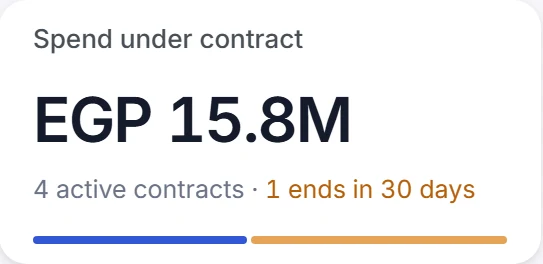
The Spend under contract metric card on the Vendor HUB dashboard: EGP 15.8M, four active contracts, one ends in 30 days.

Above: a simplified script, with shortened module and field names. Below: the card it feeds on the dashboard. The real Spend under contract script is longer and returns a styled card.

Filter it, run it again, take the rows

Anyone with access opens a report, narrows it by date or with a filter, and runs it again with Refresh. Export saves report data as a CSV file; charts export their grouped rows. Open the data behind a chart to see the numbers it draws.

  • ExportCSV for report data; PDF for custom-layout reports.
  • Run againRefresh runs the report again, with the date range and filter you chose.
  • AccessCreating and viewing reports are permissions in each profile.
Vendor HUB · Reports · Payables by vendor
The Payables by vendor report open in Vendor HUB: Refresh, Export and Edit buttons, date range chips and a Filter button above a bar chart with a 11.1M total, and a Data behind this chart table below.
  1. 1
    Refresh and Export

    Refresh runs the report again. Export saves report data as a CSV file; charts export their grouped rows.

  2. 2
    Date ranges and a filter

    All time, this month, last 30 days or a custom range, plus a Filter button, for whoever is looking.

  3. 3
    The data behind the chart

    Open it to see the numbers the chart draws, with each group’s share.

Watch a report built, opened and put on a dashboard

Three short recordings from Vendor HUB, an application built on Beezr. The data is demo data.

Report builder · Payables by vendor
Vendor HUB · Reports
Vendor HUB · Home dashboard

A report built from nothing: choose Invoices, pick the fields, choose a bar chart, add a filter, save it, open it and look at the data behind it.

The reports library, then the Contract value by type donut, the data behind it and the Export menu.

The Vendor HUB home dashboard, scrolled from the metric cards down to the lists below and back up.

How it connects

Reports read the records that the other parts of the platform produce.

Data

A report reads the same records as every form and list, so a number in a report is the number on the record.

Data and interfaces
User interfaces

A smart view can hold a report in a tab, so the chart sits on the record page it explains.

Data and interfaces
Workflows

What a workflow writes into a record shows up in the next report. Workflow runs and approval times have their own Process insights page.

Workflows and approvals
Security

Permission profiles say who can create and who can view reports, and dashboard access is configured by role.

Security and governance

In a customer’s words

We didn’t have an automated system that can link the Sales with Production and with Inventory. All divisions were working manually to integrate with each other. Beezr helped us in automation of sales and purchase orders with production. We can generate reports with one click.

Photo of Rakhi BarthwalRakhi BarthwalProcurement Manager

Questions people ask

Can a report use fields from related records?

Yes. A report starts from one module and can use fields from the modules it is related to, and from one step further. A payables report can group invoices by the vendor’s trade name without exporting anything.

Which kinds of report can I build?

Seven: table, custom table, bar chart, line chart, pie chart, donut chart and custom layout. Bar and line charts can compare two or more filtered groups, and line charts group a date field by day, month, month name or year.

Can I put a report on a dashboard?

Yes. A dashboard page is built from sections of one to four columns. A report block places a saved chart or table, a metric block shows a number written in Smart Script, and a custom HTML block holds your own markup. You can choose which roles can access a page.

How do I get the numbers into Excel?

Export report data as a CSV file; chart reports export their grouped rows. Data views can export all columns or the current view's columns as an Excel file emailed to the address you give.

Can I write my own KPI?

Yes. A metric block’s value is a Smart Script, which is JavaScript that reads your records and returns what the card shows. It can add up, count and average over any module, and a Run test button sits under the editor.

Who can see a report or a dashboard?

Permission profiles control who can create and who can view reports, module by module. Dashboard access can also be configured by role. The Security and governance page covers the rest.

What data do the examples use?

Vendor HUB, a procurement application built on Beezr, with demo data: vendors, bids, contracts, purchase orders and invoices.

Start with the problem in front of you.

Show us the process you are trying to improve. We will tell you whether Beezr looks like a fit and how we would approach it.

Next on the tour

Next: Security and governance

Who sees what, down to the field, and how people sign in.

The Beezr Roles Manager: cards for each role with its permission profile and the number of users.