Skip to content

Integration

Connect the systems you already run. Even the ones without an API.

Beezr connects in three ways. Ready connectors in the Integration Hub, REST API steps inside any workflow to read and write to systems with an API, and Web Agents that work a website the way a person would when there is no API at all.

See all 50+ connectors ?

Designer · Workflows · REST API and Web agent steps
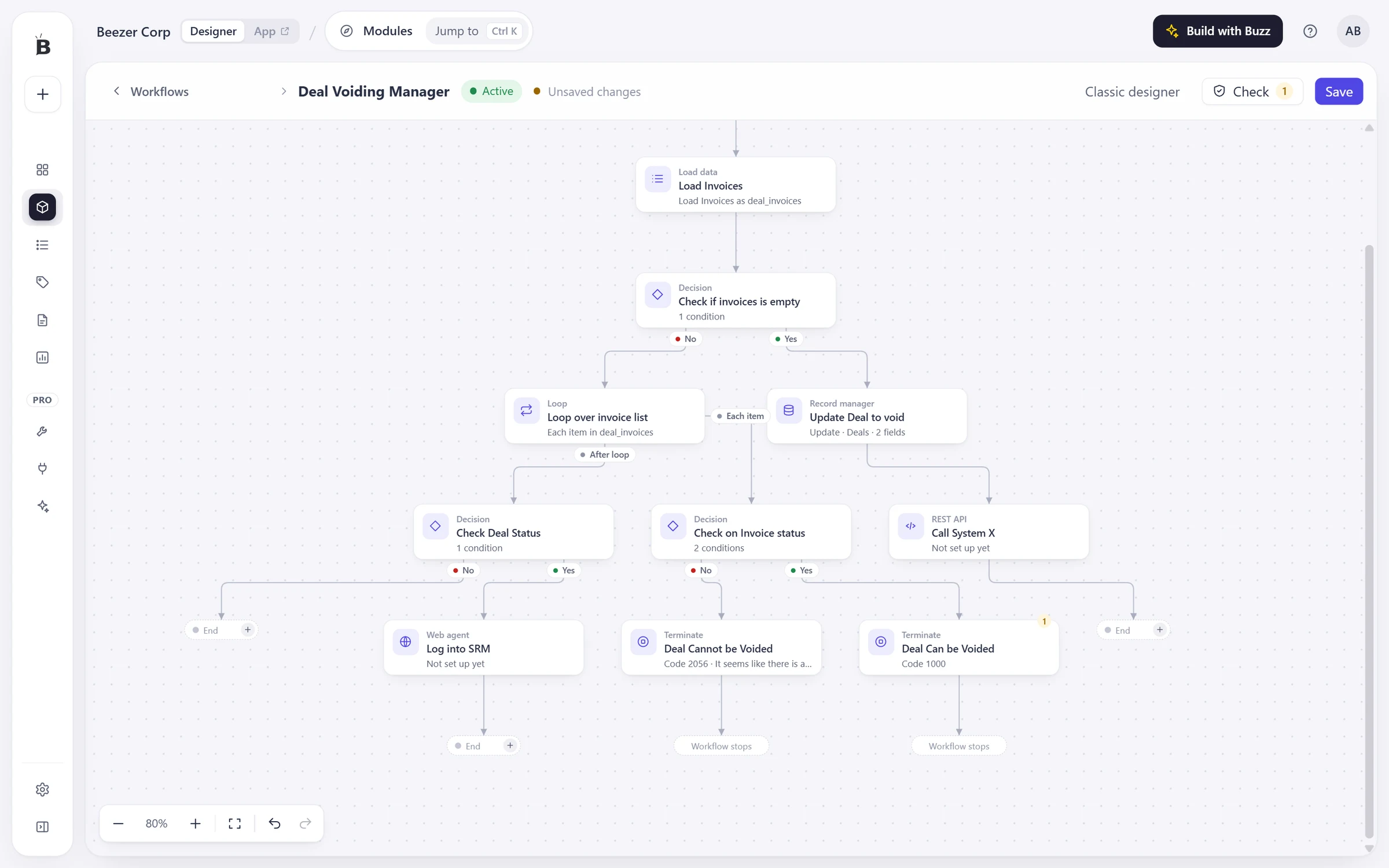
A Beezr workflow canvas with a Load data step, decisions, a loop, a records manager step, a REST API step named Call System X and a Web agent step named Log into SRM.
  1. 1
    REST API step

    Calls any HTTP endpoint. Here it sits after a record update and before the end of the process.

  2. 2
    Web agent step

    Works a website the way a person would, for a system that has no API.

  3. 3
    Records manager

    Writes the outcome back to the record, so what the other system said is part of the record.

Two of the three ways, on the canvas. Both steps are placed in the process, next to decisions, a loop and a record update. The Integration Hub is the third, and it has its own page in the Designer.

Ready connectors in the Integration Hub

The Integration Hub is the catalogue of ready connectors: accounting, storage, messaging, payments, delivery, CRM and more. Connect a system once, then use it in any workflow.

Each connector comes with its own actions. In a workflow you add an Integration step, choose a connection, then choose an action.

  • Use it forSystems that already have a connector.
  • Sign inSet per connector: OAuth 2, API key, basic or access token.
Designer · Integration hub
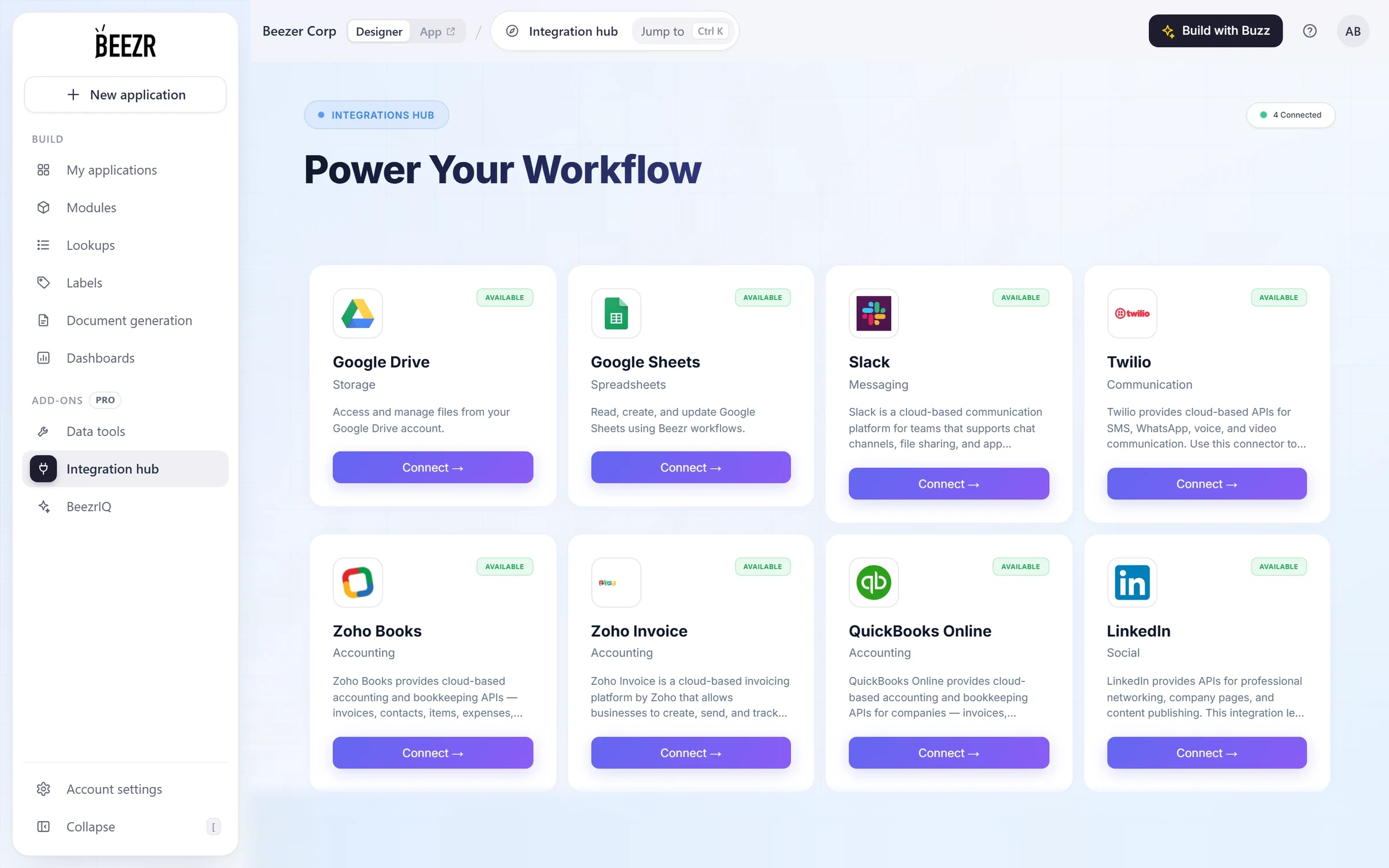
The Beezr Integration hub: connector cards for Google Drive, Google Sheets, Slack, Twilio, Zoho Books, Zoho Invoice, QuickBooks Online and LinkedIn, each marked Available with a Connect button.
  1. 1
    A connector

    Each card is a ready connector with its category and what it does.

  2. 2
    Connect

    Sign in to the other system from its card. The sign-in method is set per connector: OAuth 2, API key, basic or access token.

  3. 3
    Connected

    A count of the connections this workspace already has.
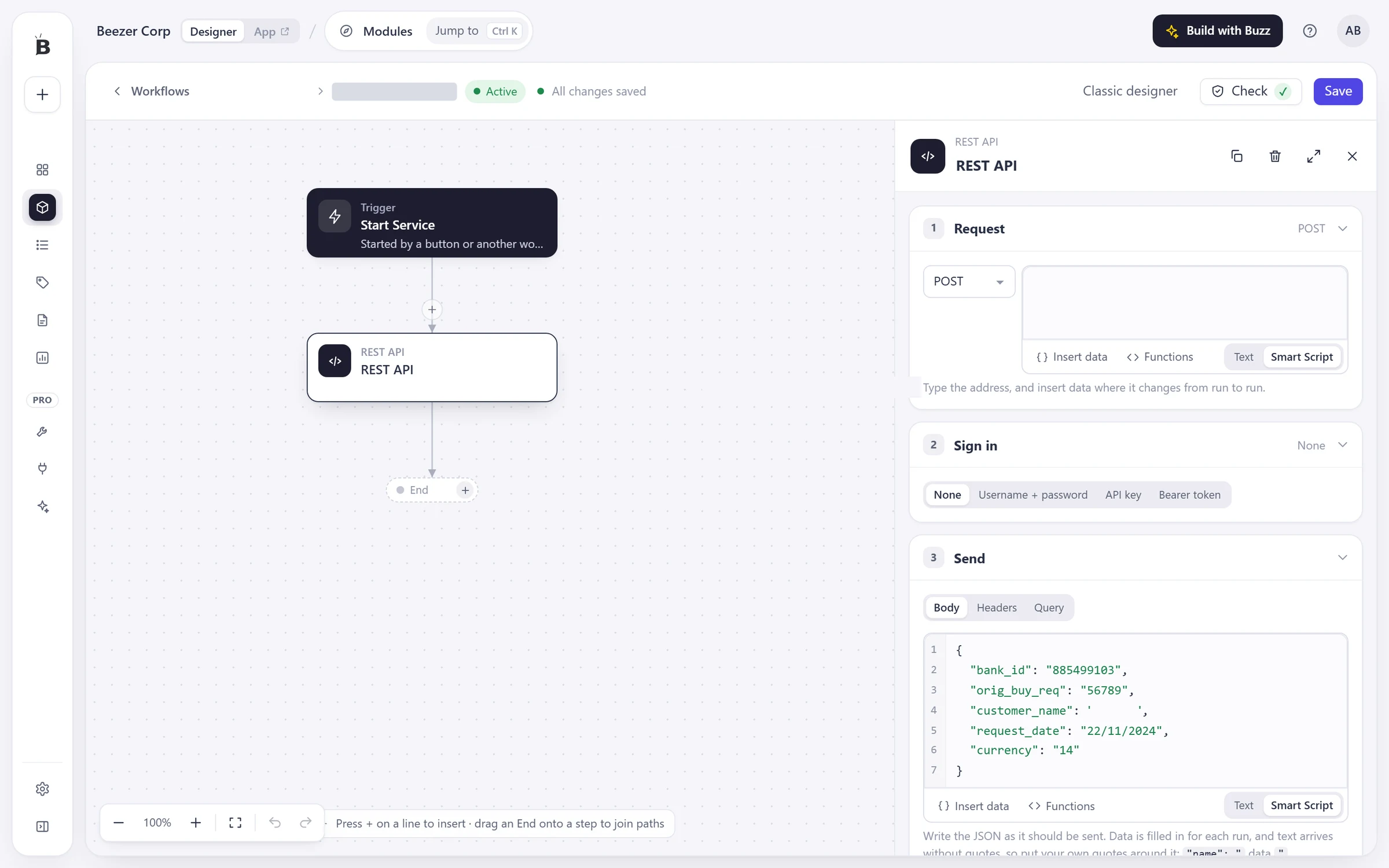
REST API steps for any system with an API

When there is no connector, a REST API step calls the system directly. It sends the request you describe, signs in the way the system expects, and maps the reply into the workflow.

Calls can be made safe to repeat: set timeouts, retries with backoff on the status codes you choose, and an idempotency key header.

  • ResilienceConnect and read timeouts, retries with backoff, an idempotency key.
  • SuccessChoose which status codes count as success, and fail the step on the rest.
  • LogsRequests and replies can be logged with headers masked.
Designer · Workflows · REST API step
The REST API step panel in the Beezr workflow designer: the POST method and an address field, the Sign in options None, Username and password, API key and Bearer token, and a JSON body written with Smart Script.
  1. 1
    Method and address

    GET, POST, PUT, PATCH or DELETE. Insert data from the record wherever the address changes from run to run.

  2. 2
    Sign in

    None, username and password, API key or bearer token, whichever the other system expects.

  3. 3
    Body

    Write the JSON as it should be sent, with data inserted from the record, as text or Smart Script.

  4. 4
    The step

    It sits on the canvas like any other step, with a next step after it.

Web Agents for systems with no API

Connect to a system through its website. A Web agent step does what a person would do in a browser: it opens a page, signs in, fills in fields, chooses options, clicks, waits for a table or a download, and takes a screenshot.

It can bring back a file, such as xlsx, pdf, docx or csv, or map what it found into the fields of a record. The workflow waits for it, and the job survives a restart.

  • Use it forA supplier portal, a government site, an old system.
  • Runs asA separate service with a job queue.
Designer · Workflows · Web agent step
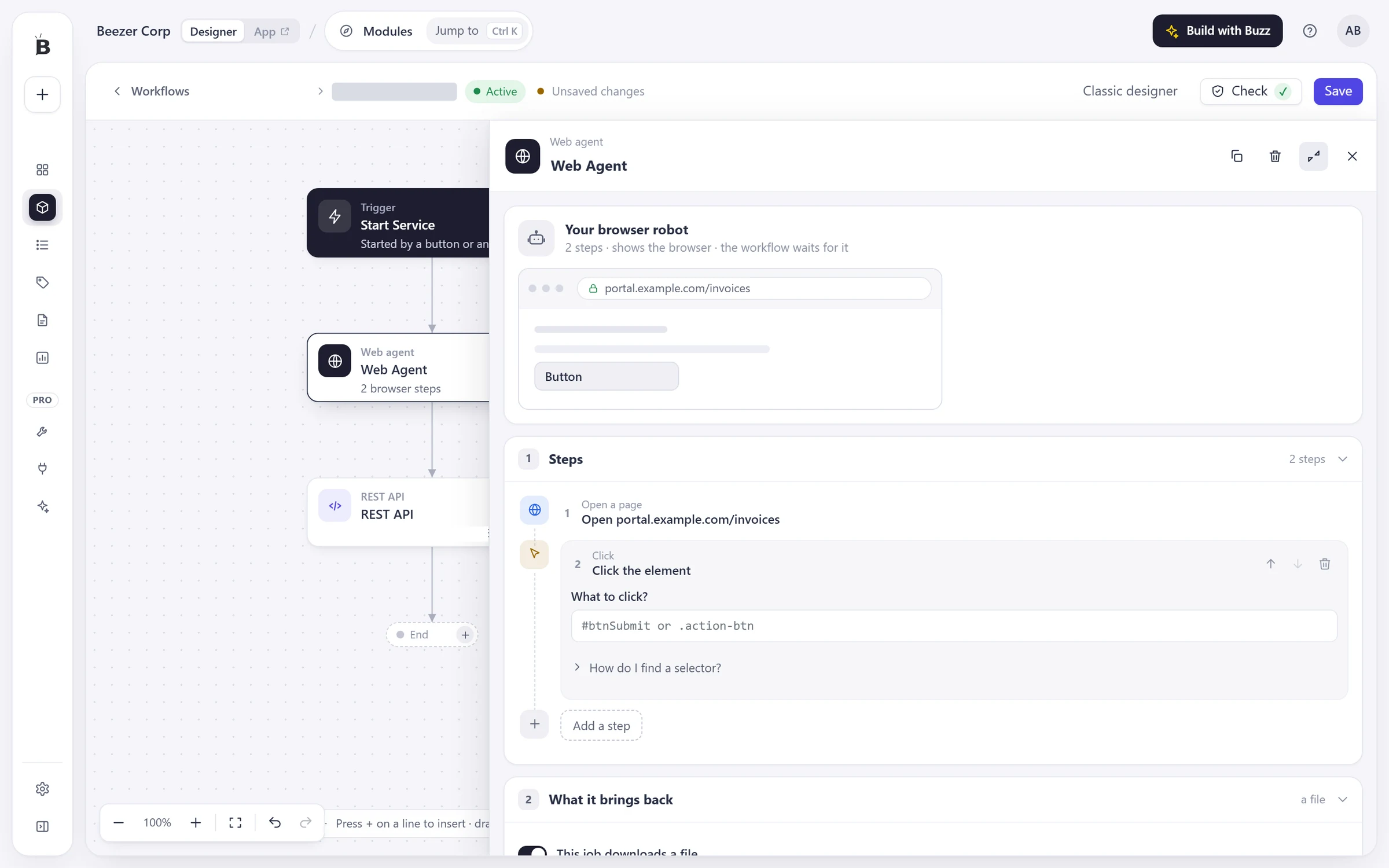
The Web agent step panel in the Beezr workflow designer: a browser preview of an example invoices portal, a list of steps that opens a page and clicks an element, and a section for what the agent brings back.
  1. 1
    Your browser robot

    A preview of the page the agent works on. The workflow waits for it to finish.

  2. 2
    Steps

    Open a page, log in, fill in a field, choose an option, click, wait for a table or a download, take a screenshot.

  3. 3
    What it brings back

    A downloaded file, or results mapped into the fields of a record.

Let other systems call Beezr with a webhook

Set a workflow’s trigger to “From a webhook” and another system can start it by calling a URL. Beezr stores each call in a durable queue before it answers 202, and keeps the call through a server restart.

Require an API key, and callers must send it in the api-key header. Send the result back, and Beezr posts the outcome to your URL when the run succeeds, fails or either.

  • Answer202 Accepted, with a process ID, before the workflow runs.
  • SecuredAuthenticate callers with an API key in the api-key header.
  • CallbackThe run result, posted to your URL with an optional shared secret.

A call from another system

POST /webhook/{id}
api-key: ········
Content-Type: application/json

{ "invoice": "INV-2026-0008", "paid": true }

→ 202 Accepted, with a process ID

Illustration of a call. Beezr stores the payload in a durable queue before it answers, retries with backoff and survives a restart. Delivery is at least once, so make the receiving steps safe to repeat.

Designer · Workflow settings
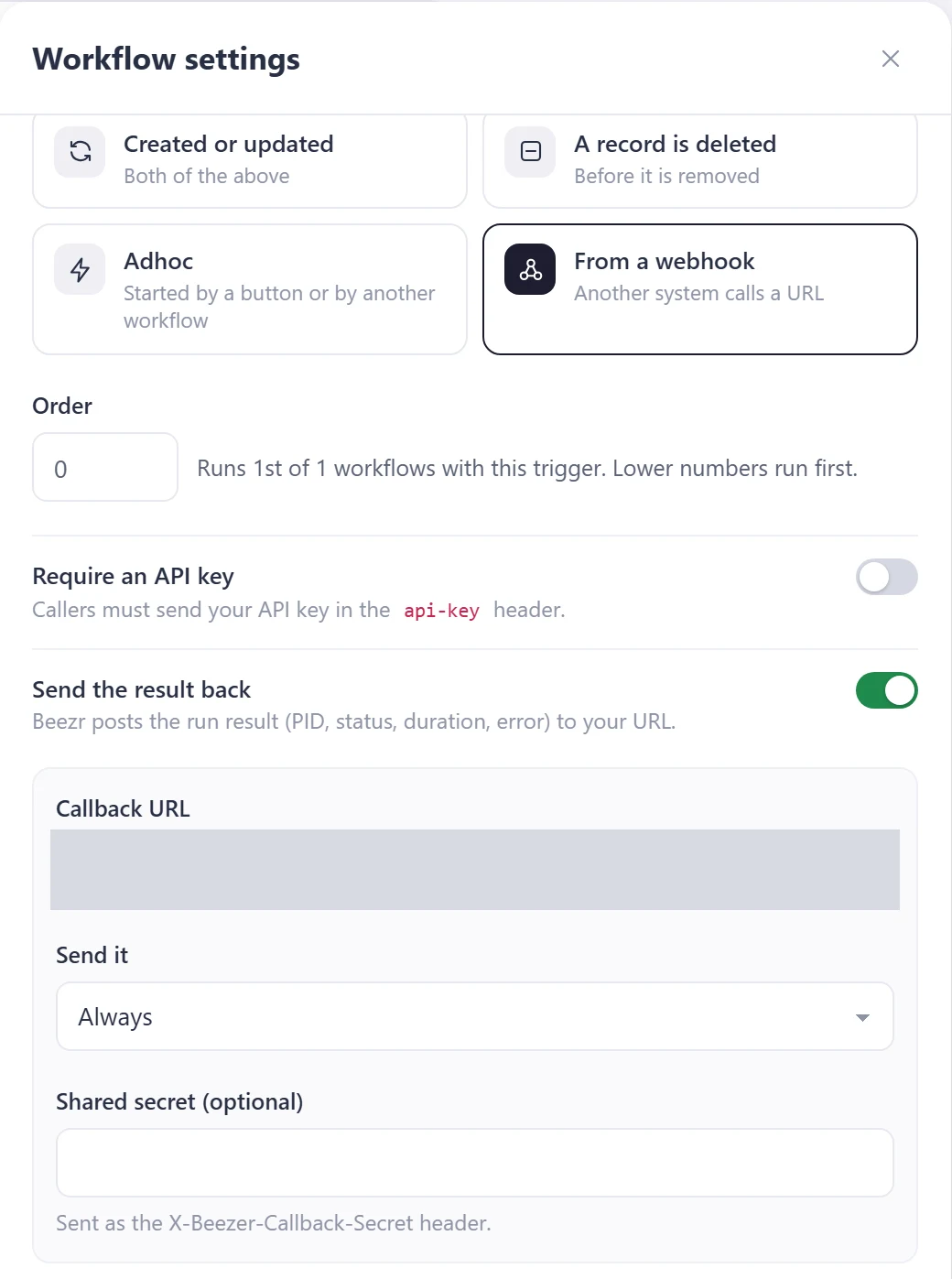
The Workflow settings panel for a workflow triggered From a webhook: the trigger choices, an order field, a Require an API key switch, a Send the result back switch with a masked callback URL, and a shared secret field.
  1. 1
    From a webhook

    The trigger that lets another system start the workflow by calling a URL.

  2. 2
    Require an API key

    Callers must send your API key in the api-key header.

  3. 3
    Send the result back

    Beezr posts the run result to your URL on success, on failure or always, with an optional shared secret.

API keys, one for each system

An API key authenticates calls to retrieve module records or trigger a webhook workflow. Give each system its own key, named after it, so you can pause one without breaking the others.

Records a key creates or changes show the name you chose in the activity log.

  • One per systemName it after the system that will use it.
  • Pause and resumeManage each system?s key independently.
  • CopyReveal or copy a key again whenever you need it.
Designer · Account settings · API keys
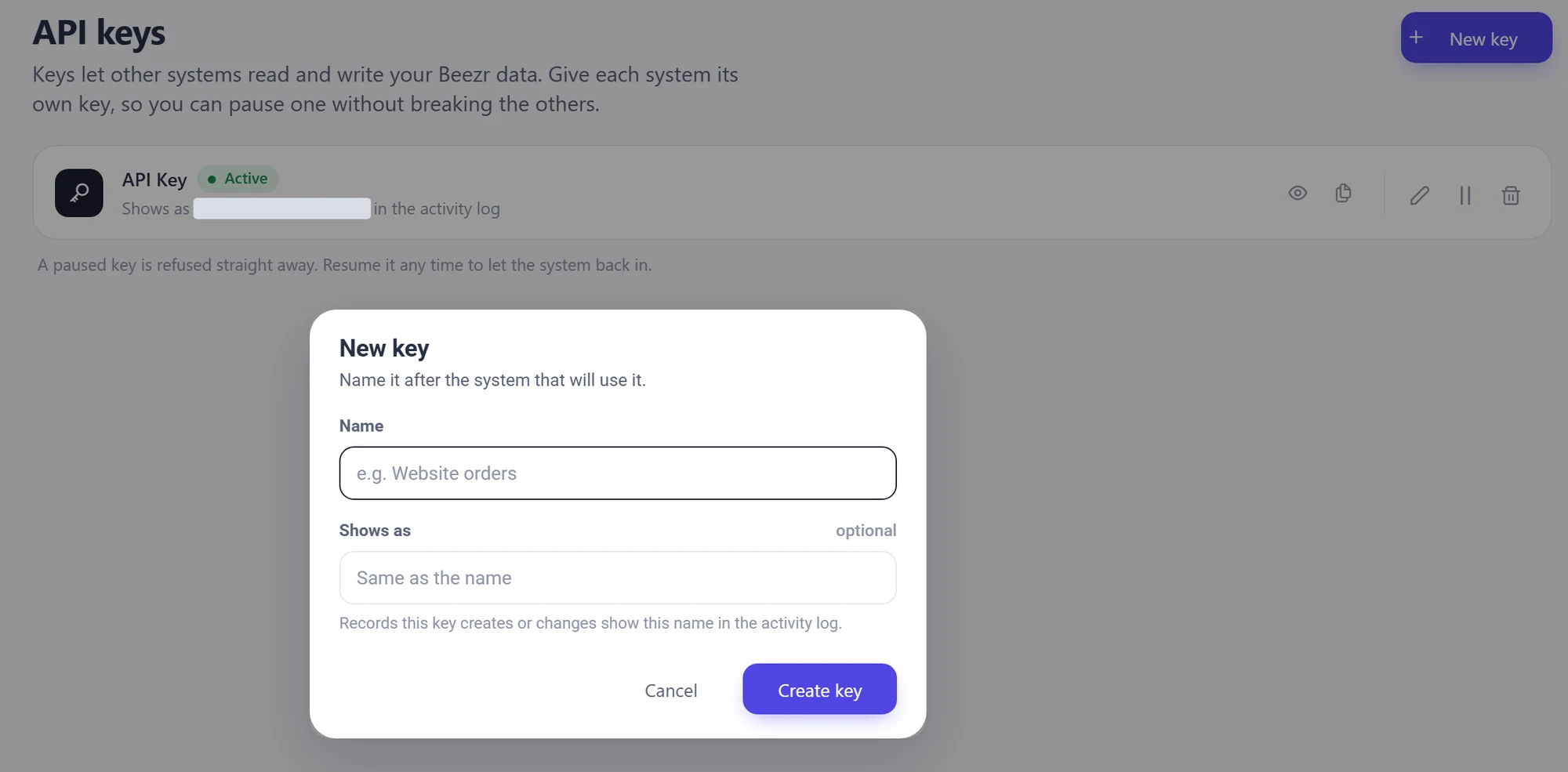
The API keys page in the Beezr Designer with the New key dialog open: a name field, an optional Shows as field and a Create key button, above a list with one active key.
  1. 1
    One key per system

    Create a key for each system and name it after the system that will use it.

  2. 2
    Reveal, copy, rename, pause, delete

    Copy a key again whenever you need it. Pause one and the others keep working.

  3. 3
    Pause and resume

    Pause a system?s key and resume it when needed.

Data in and out, with no connector

Records move in and out of Beezr without building anything. Import records into any module from a .csv, .xlsx or .xls file: download the template, fill it in and upload it.

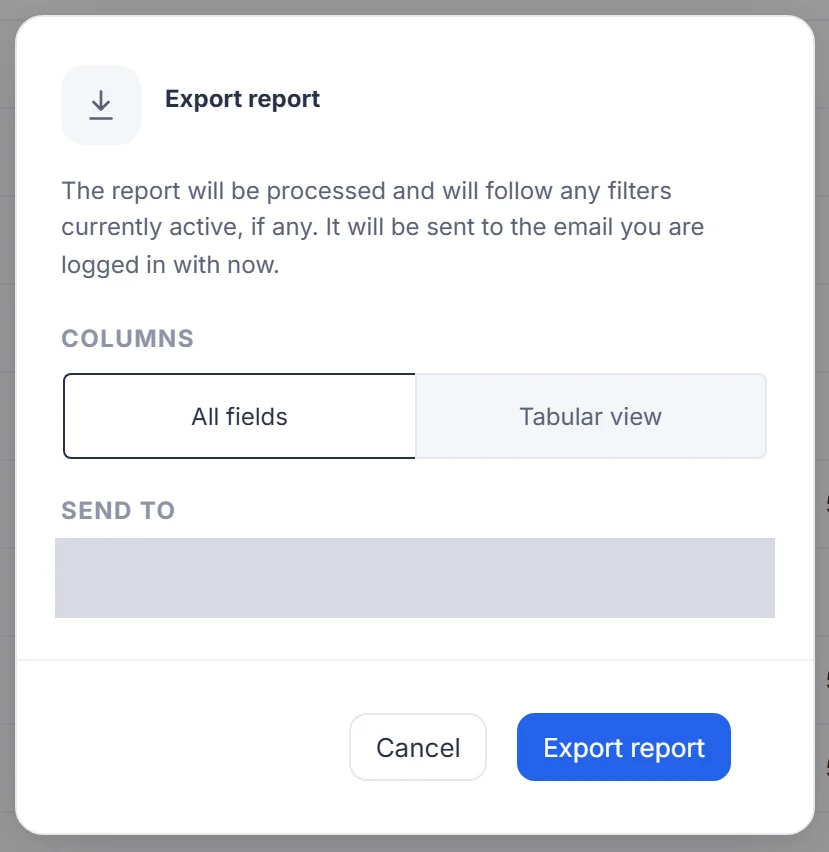
Export a list as Excel. Beezr prepares the file and emails it to the address you choose, with all fields or the columns of the current view.

  • ImportFrom any data view: download a template, upload, confirm.
  • ExportExcel, emailed. It follows the filters you have on.
  • In workflowsCSV and JSON parser steps read files and replies. Google Sheets runs through the Integration step.
App · Import
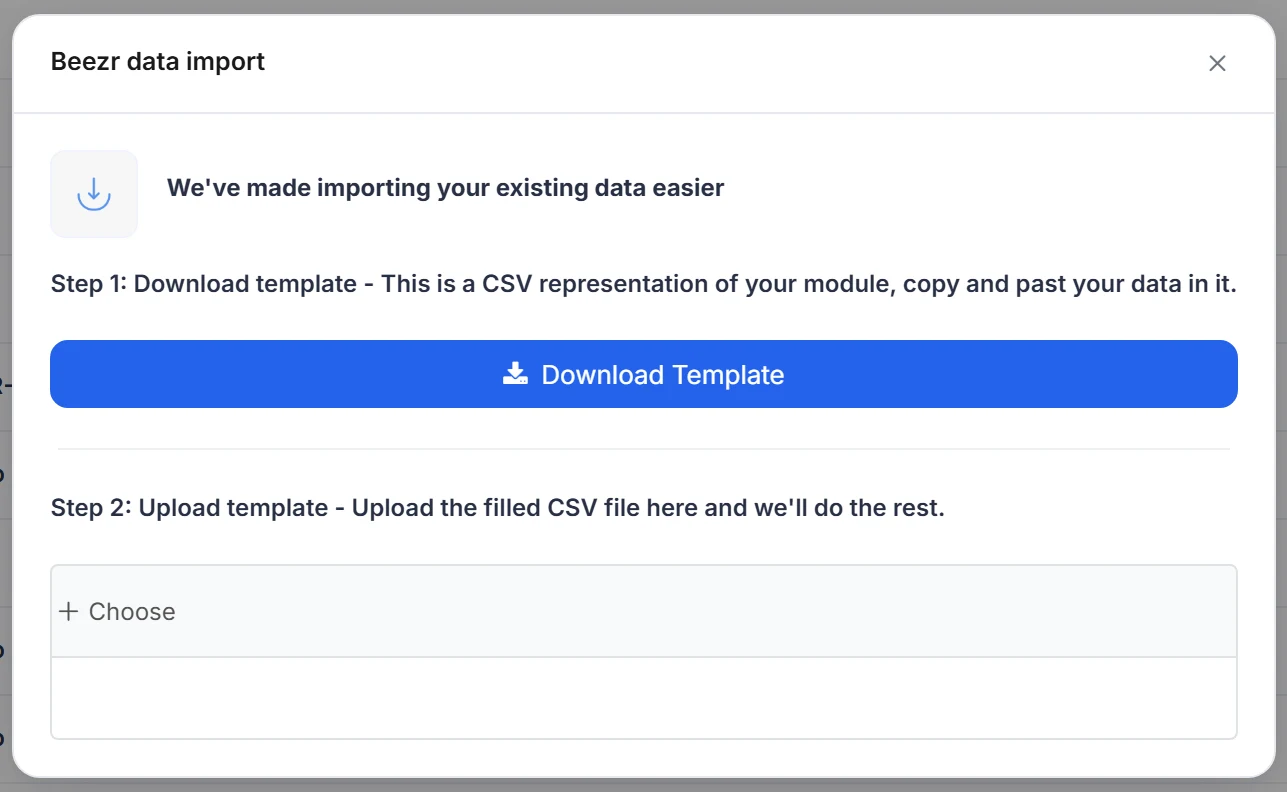
The Beezr data import dialog in the application: step 1 to download a template, and step 2 to upload the filled file.
App · Export
The Export report dialog in the application: a Columns choice between All fields and Tabular view, and a Send to field that holds the email address the file is sent to.

Follow one invoice

An approved invoice is posted to an accounting system, and the system’s reply is written back to the record. This is an illustration, not a recording.

Invoice approvedApproval task
REST API stepPOST to the accounting systemapproved
Accounting systemOutside Beezrrequest
Records managerUpdates the invoicereply

What Beezr sends

POST https://accounting.example.com/v1/bills
Authorization: Bearer ········
Content-Type: application/json

{
  "vendor": "Nile Crest FM",
  "invoice_number": "INV-2026-0008",
  "amount": 18450.00,
  "currency": "EGP"
}

What comes back

201 Created

{
  "id": "BILL-30417",
  "status": "posted"
}

What lands on the record

Invoice
INV-2026-0008
Accounting reference
BILL-30417
Posting status
Posted

Illustration of a Beezr setup. The system, address and values are examples.

The same shape works with an Integration Hub connector instead of the REST step, and with a Web agent step when the accounting system has no API: the workflow waits for the answer and writes it to the record.

How it connects

Integration steps live on the workflow canvas, and what they bring in lands in your records.

Workflows

A REST API step, an Integration step or a Web agent step sits on the canvas next to approvals and record updates.

Workflows and approvals
Data

What a connector, a webhook or an import writes lands in the records you defined.

Data and interfaces
Reports

Data that arrives through a connector is a record like any other, so reports read it.

Reports and dashboards

In a customer’s words

Beezr’s easy to drag and drop tools are built to customize and automate the processes in few clicks. Beezr’s SaaS model is recommended for anyone looking for cost effective, efficient, and productive workflows that can be amazingly quick to implement in real time.

Photo of Rekha SetpalRekha SetpalHead of in5 Program

Questions people ask

Which systems can Beezr connect to?

Connect in three ways. The Integration Hub has ready connectors, among them Google Drive, Google Sheets, Slack, Twilio, Zoho Books, Zoho Invoice, QuickBooks Online and LinkedIn. A REST API step reads and writes to any system with an API. A Web agent works a website when there is no API.

What if the system we use has no API?

Use a Web agent step. It opens the site in a browser, signs in, fills in fields, clicks, waits for a table or a download and brings back a file or values.

Can another system start a workflow in Beezr?

Yes. Set the trigger to “From a webhook” and the workflow gets its own address. Require an API key, and callers must send it in the api-key header. Beezr answers 202 with a process ID and can post the result back to your URL.

What happens if a webhook call arrives while Beezr is restarting?

Beezr stores each call in a durable queue before it answers, retries with backoff and survives a restart. Delivery is at least once, so make the receiving steps safe to repeat.

How do I stop a REST call from posting twice?

The REST API step can send an idempotency key header, and it has timeouts, retries with backoff on the status codes you choose, and a list of the status codes that count as success.

Does Beezr show secrets in its logs?

The REST API step can log requests and replies with sensitive headers masked. You choose whether to log.

How do I get existing data in, or a copy out?

Import records from a .csv, .xlsx or .xls file in any data view, using the template Beezr gives you. Export a list as Excel: the file is prepared and emailed to the address you choose. Neither needs a connector.

Start with the problem in front of you.

Show us the process you are trying to improve. We will tell you whether Beezr looks like a fit and how we would approach it.

Next on the tour

Next: Reports and dashboards

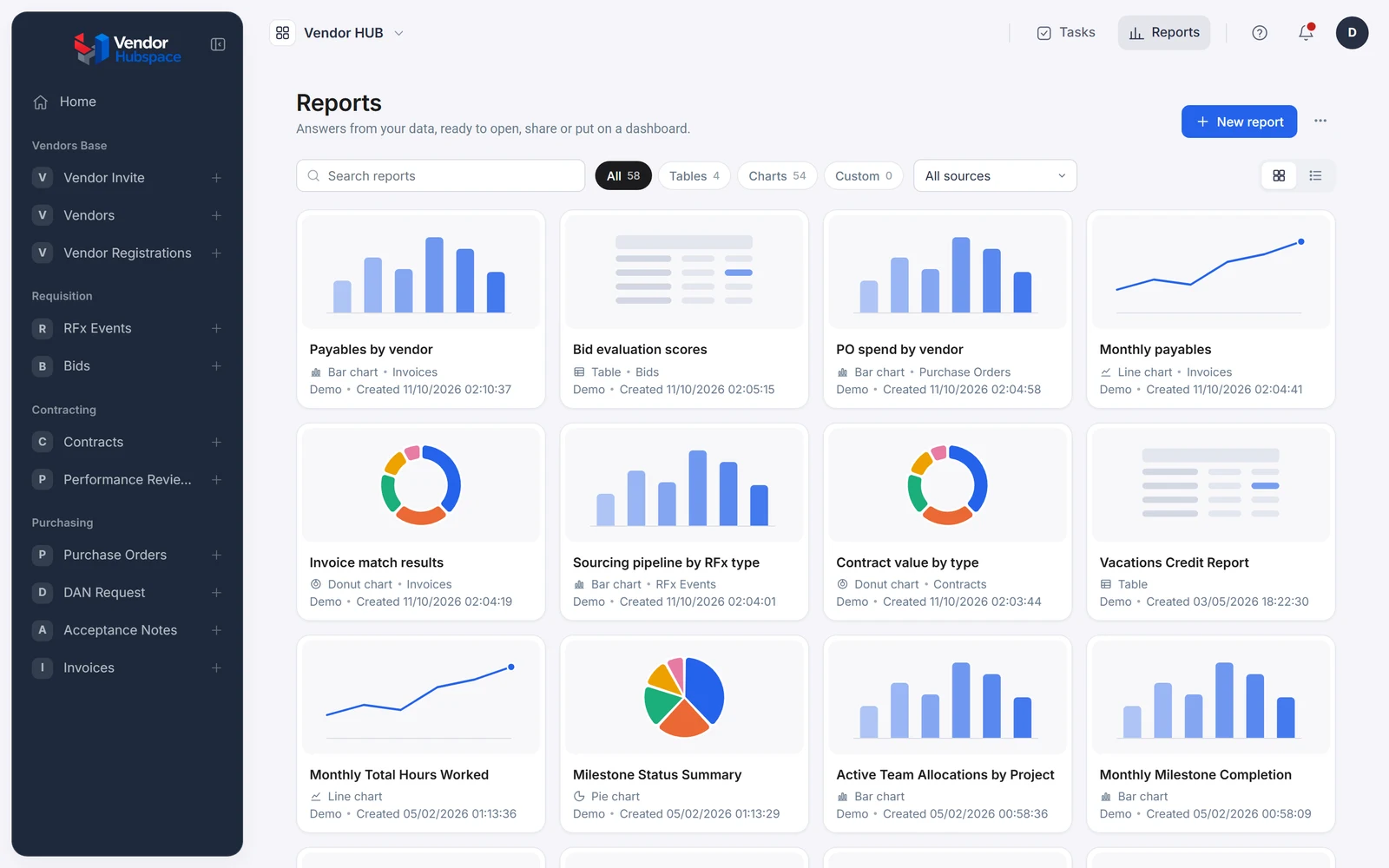
Reports on the same records, with fields from related records, placed on dashboards.

The Vendor HUB reports library: procurement reports shown as preview cards with bar charts, donut charts and tables.