Skip to content

For developers

Visual where it’s faster. Code where it’s clearer.

Most of a Beezr application is configured. When a rule is easier to write than to draw, Smart Script lets you write it in JavaScript against your own records, functions and workflows, inside the same platform.

Designer · Dashboard builder
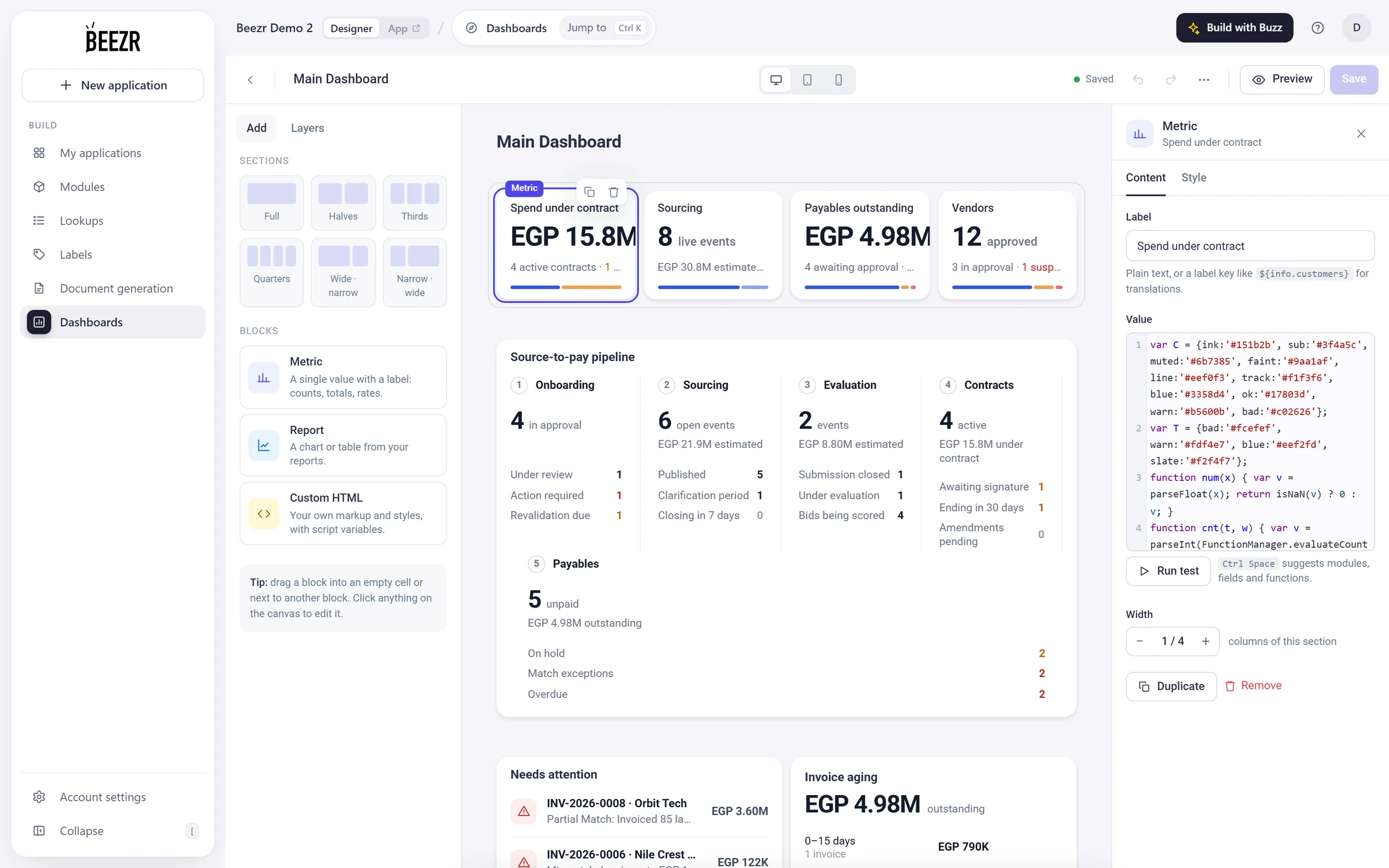
The Beezr Designer dashboard builder with the Spend under contract metric card selected. In the side panel, the card’s value is a Smart Script in a code editor, with a Run test button beneath it.
  1. 1
    A card on the dashboard

    Each block is placed in a grid. This one is a Metric: a single value with a label.

  2. 2
    Its value is a script

    Smart Script, with Ctrl Space to suggest modules, fields and functions.

  3. 3
    Run test

    Runs the script and shows what it returned and how long it took, or the error.

A real script, and the card it draws

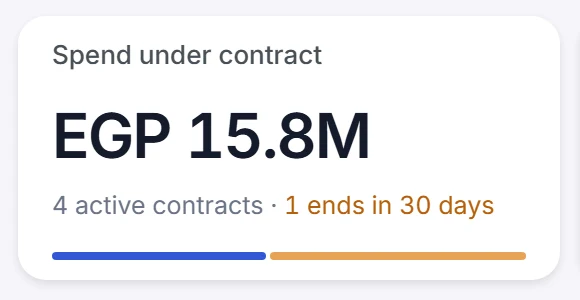
This is the script behind the Spend under contract card on a Vendor HUB dashboard, as it is stored. It adds up the value of the active contracts, counts them and the ones ending soon, and builds the card as HTML. The last expression is the output.

ConfigureThe script, in the Designer

ValueCtrl Space suggests modules, fields and functions.Done
Lines 1 to 33: helper functions shared by the cards on this dashboard
var C = {ink:'#151b2b', sub:'#3f4a5c', muted:'#6b7385', faint:'#9aa1af', line:'#eef0f3', track:'#f1f3f6', blue:'#3358d4', ok:'#17803d', warn:'#b5600b', bad:'#c02626'};var T = {bad:'#fcefef', warn:'#fdf4e7', blue:'#eef2fd', slate:'#f2f4f7'};function num(x) { var v = parseFloat(x); return isNaN(v) ? 0 : v; }function cnt(t, w) { var v = parseInt(FunctionManager.evaluateCount(t, w) || '0', 10); return isNaN(v) ? 0 : v; }function sum(f, t, w) { return num(FunctionManager.evaluateSumFunction(f, t, w)); }function money(v) { v = num(v); if (v >= 1000000) { return 'EGP ' + (v / 1000000).toFixed(v >= 10000000 ? 1 : 2) + 'M'; } if (v >= 1000) { return 'EGP ' + Math.round(v / 1000) + 'K'; } return 'EGP ' + Math.round(v); }function esc(s) { return String(s == null ? '' : s).replace(/&/g, '&amp;').replace(/</g, '&lt;').replace(/>/g, '&gt;'); }function cut(s, n) { s = String(s == null ? '' : s); return s.length > n ? s.substring(0, n - 1) + '…' : s; }function fv(rec, f) { var x = rec.getFieldValueMap().get(f); var v = x ? x.getCurrentValue() : null; return (v === null || v === undefined) ? '' : String(v); }var _lk = {};function lab(t, id) { if (!id) { return ''; } id = String(id).replace(/\.0+$/, ''); var k = t + '|' + id; if (_lk[k] === undefined) { var r = null; try { r = FunctionManager.resolveLookupIdValue(t, id); } catch (e) { r = null; } _lk[k] = r ? String(r) : ''; } return _lk[k]; }var _vn = {};function vendor(id) { if (!id || id === '0') { return ''; } if (_vn[id] === undefined) { var n = ''; try { n = FunctionManager.loadValueByClause('trade_name', 'cm_vendor_base', 'WHERE cm_vendor_base.vendor_pr_id = ' + parseInt(id, 10)); } catch (e) { n = ''; } _vn[id] = n ? String(n) : ''; } return _vn[id]; }function parseDate(str) { if (!str) { return null; } var s = String(str).trim(); if (/^\d+$/.test(s)) { return new Date(parseInt(s, 10)); } var p = s.split('T')[0].split(' ')[0].split('-'); if (p.length === 3) { return new Date(parseInt(p[0], 10), parseInt(p[1], 10) - 1, parseInt(p[2], 10)); } var q = s.split(' ')[0].split('/'); if (q.length === 3) { return new Date(parseInt(q[2], 10), parseInt(q[1], 10) - 1, parseInt(q[0], 10)); } return null; }function daysFromToday(str) { var d = parseDate(str); if (!d) { return null; } var t = new Date(); t = new Date(t.getFullYear(), t.getMonth(), t.getDate()); return Math.round((d.getTime() - t.getTime()) / 86400000); }var MON = ['Jan','Feb','Mar','Apr','May','Jun','Jul','Aug','Sep','Oct','Nov','Dec'];function dshort(str) { var d = parseDate(str); return d ? d.getDate() + ' ' + MON[d.getMonth()] : ''; }function icon(name, color) {  var p = {    doc: "<path d='M14 3H7a2 2 0 0 0-2 2v14a2 2 0 0 0 2 2h10a2 2 0 0 0 2-2V8z'/><path d='M14 3v5h5'/>",    pen: "<path d='M12 20h9'/><path d='M16.5 3.5a2.1 2.1 0 0 1 3 3L7 19l-4 1 1-4z'/>",    alert: "<path d='M12 3 2 20h20z'/><path d='M12 10v4M12 17h.01'/>",    clock: "<circle cx='12' cy='12' r='9'/><path d='M12 7v5l3 2'/>",    box: "<path d='M21 8 12 3 3 8v8l9 5 9-5z'/><path d='M3 8l9 5 9-5M12 13v8'/>",    scale: "<path d='M12 3v18M5 21h14M3 8l4-5 4 5M13 8l4-5 4 5'/><path d='M3 8a4 4 0 0 0 8 0M13 8a4 4 0 0 0 8 0'/>",    users: "<path d='M16 21v-2a4 4 0 0 0-4-4H6a4 4 0 0 0-4 4v2'/><circle cx='9' cy='7' r='4'/>",    check: "<path d='M20 6 9 17l-5-5'/>"  }[name] || '';  return "<svg width='15' height='15' viewBox='0 0 24 24' fill='none' stroke='" + color + "' stroke-width='1.8' stroke-linecap='round' stroke-linejoin='round'>" + p + "</svg>";}function tile(name, bg, color) { return "<div style='width:30px;height:30px;border-radius:8px;background:" + bg + ";display:flex;align-items:center;justify-content:center'>" + icon(name, color) + "</div>"; }function status(text, tone) { return "<span style='display:inline-flex;align-items:center;gap:8px;font-size:12.5px;color:" + (C[tone] || C.sub) + "'><span style='width:1px;height:12px;background:#d8dde5'></span>" + esc(text) + "</span>"; }function meter(parts) { var t = 0; parts.forEach(function (p) { t += p[0]; }); if (t <= 0) { return "<div style='height:4px;border-radius:2px;background:" + C.track + "'></div>"; } var h = "<div style='display:flex;gap:2px;height:4px'>"; parts.forEach(function (p) { if (p[0] > 0) { h += "<div style='flex:" + p[0] + ";background:" + p[1] + ";border-radius:2px'></div>"; } }); return h + "</div>"; }
 var act = "WHERE cm_contract_base.status IN ('2','8')";var soon = act + " AND cm_contract_base.end_date BETWEEN NOW() AND DATE_ADD(NOW(), INTERVAL 30 DAY)";var value = sum('contract_value', 'cm_contract_base', act);var n = cnt('cm_contract_base', act);var ending = cnt('cm_contract_base', soon);var endingV = sum('contract_value', 'cm_contract_base', soon);var cap = n + ' active contracts' + (ending > 0 ? " · <span style='color:" + C.warn + "'>" + ending + ' ends in 30 days</span>' : ''); var html = "<div style='display:flex;flex-direction:column;gap:10px;font-variant-numeric:tabular-nums;padding-top:4px'>"  + "<div style='font-size:31px;font-weight:600;color:" + C.ink + ";letter-spacing:-0.03em;line-height:1.05;white-space:nowrap'>" + (money(value)) + "</div>"  + "<div style='font-size:12.5px;color:" + C.muted + ";white-space:nowrap;overflow:hidden;text-overflow:ellipsis'>" + (cap) + "</div>"  + "<div style='margin-top:4px'>" + (meter([[value - endingV, C.blue], [endingV, "#e6a456"]])) + "</div>"  + "</div>";html
Recreated from the Designer for clarity. The script is the stored script of the Spend under contract card, unchanged.

SeeThe card, in the application

Vendor HUB · Home
The Spend under contract card in Vendor HUB: EGP 15.8M, 4 active contracts and 1 that ends in 30 days, with a two-colour bar beneath.
  • Lines 35 and 36Which contracts. A filter you write: contracts in the active statuses, and those whose end date falls in the next 30 days.
  • Lines 37 to 41What to read. sum and cnt, two helpers at the top, call FunctionManager.evaluateSumFunction and evaluateCount on your own module.
  • Lines 43 to 48The card. The HTML is built as a string, and the last expression, html, is what the dashboard shows.
Where code runs

Smart Script lets you write rules and values across records, screens and workflows.

  • On recordsSmart fields, default values, form rules that run before save, and who may edit or delete a record.
  • On screensWhen a button shows or is disabled, dashboard metrics, report columns and filters, and document templates.
  • In workflowsDecision conditions, record manager mappings, Smart Routing for approvals, the URL and body of a REST step, and a Custom function step of its own.
Designer · Workflow · Add a step
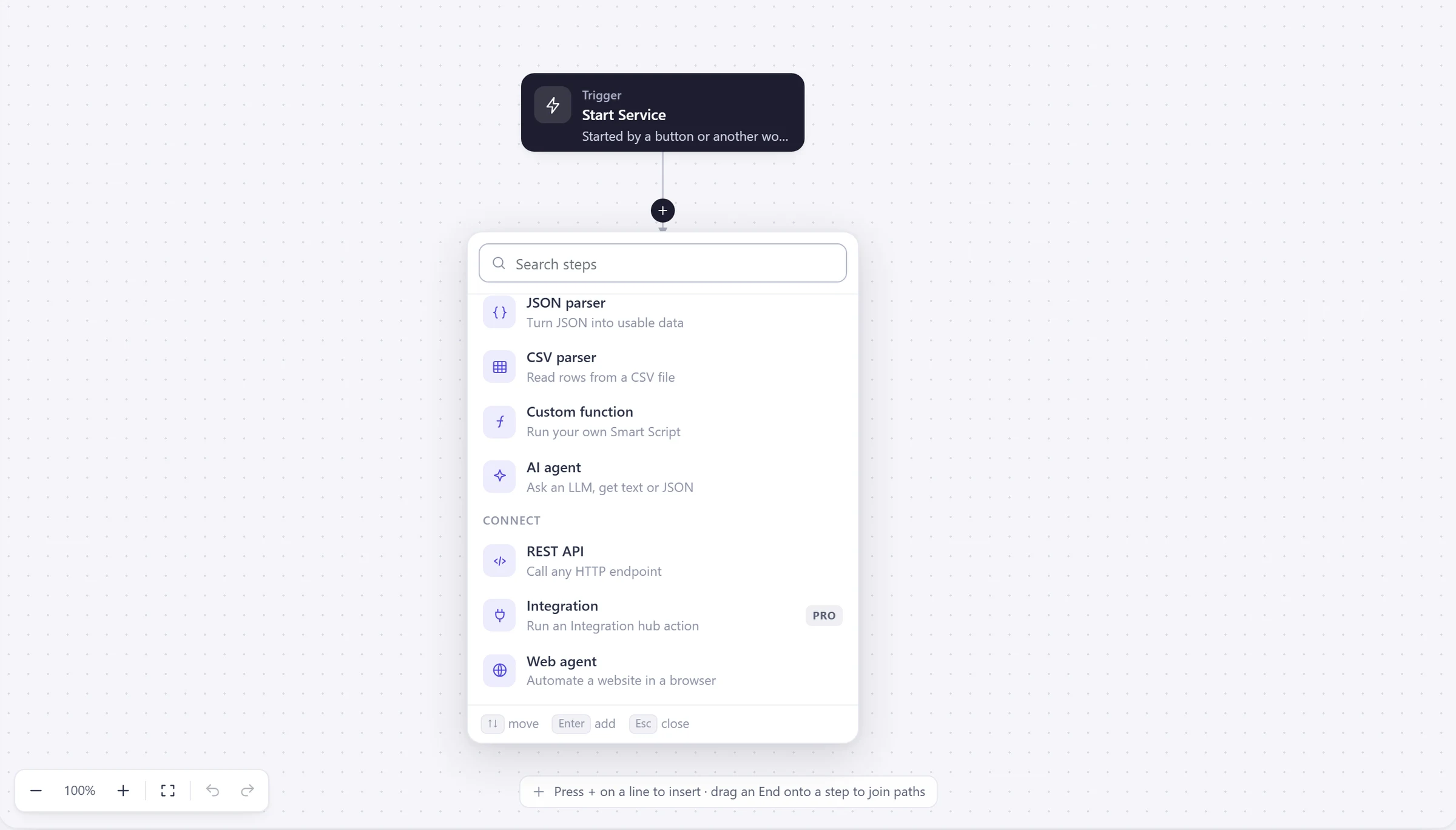
The add a step picker in the Beezr workflow designer. Under Data: JSON parser, CSV parser, Custom function (run your own Smart Script) and AI agent. Under Connect: REST API (call any HTTP endpoint), Integration and Web agent.
  1. 1
    Custom function

    Run your own Smart Script as a step, and pass the result to the next one.

  2. 2
    REST API

    Call any HTTP endpoint, with Smart Script in the URL and the body.

A function library for your own data

FunctionManager is the object your scripts call. It loads records with a filter you write, adds things up, reads lookups, formats dates and money, writes records, and starts another workflow.

  • LanguageJavaScript at the ECMAScript 5.1 level: var and function.
  • Field tokensWrite $module$.$field$ and Beezr replaces it with the record’s value.
  • SuggestionsCtrl Space lists modules, fields, lookups and FunctionManager methods.
Designer · Smart Script editor
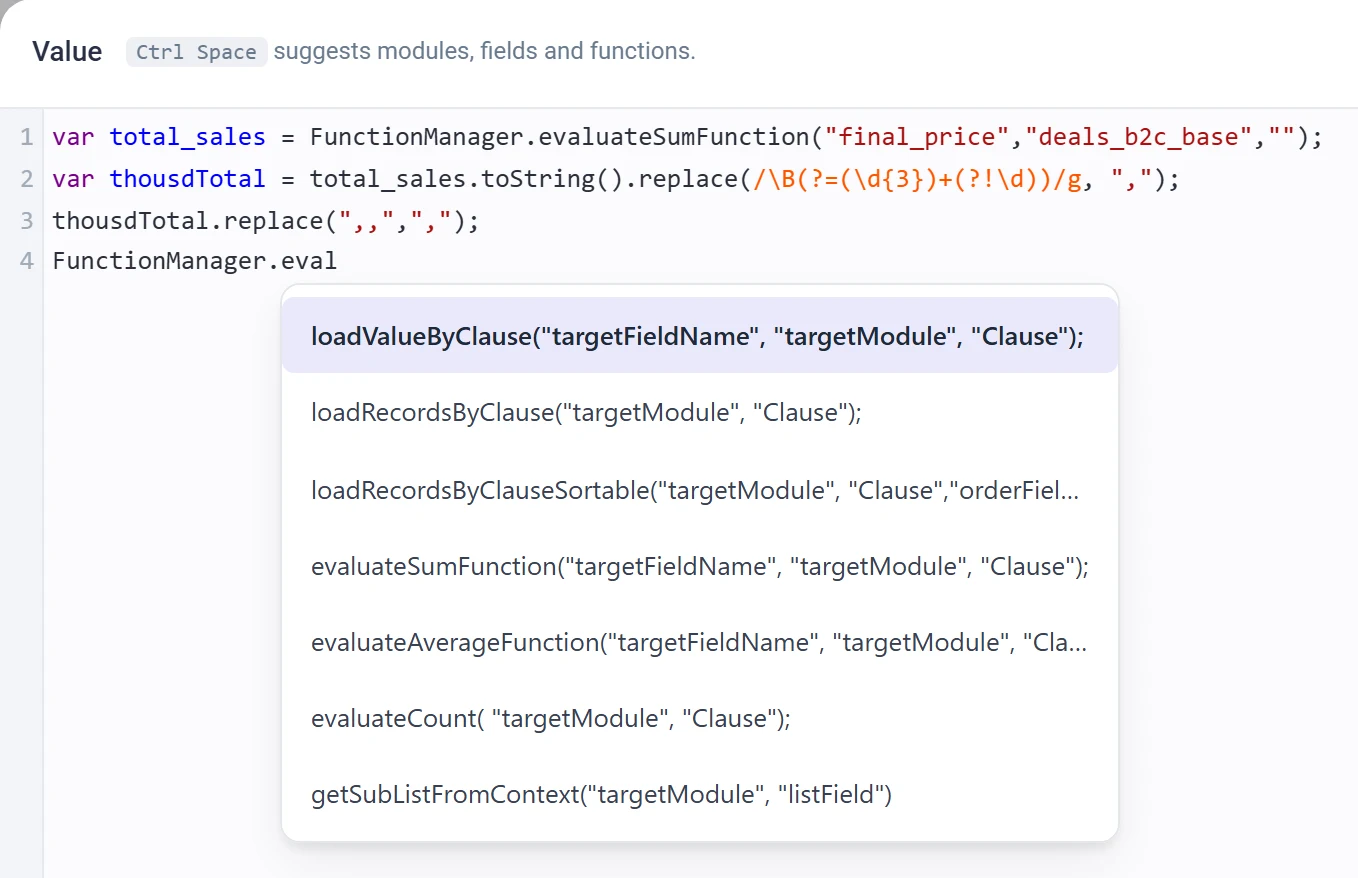
The Smart Script editor in the Beezr Designer. A short script calls FunctionManager.evaluateSumFunction, and a list of suggestions appears while typing FunctionManager.eval: loadValueByClause, loadRecordsByClause, loadRecordsByClauseSortable, evaluateSumFunction, evaluateAverageFunction, evaluateCount and getSubListFromContext.
  1. 1
    Suggestions

    Ctrl Space suggests modules, fields and functions as you type.

  2. 2
    FunctionManager

    Type FunctionManager. and the methods are listed with their arguments.

FunctionManagerthe object your scripts call

Load data

loadValueByClauseloadRecordsByClauseloadRecordsByClausePagedloadRecordsByClauseSortableloadRecordsByClauseSortablePaged

Aggregates

evaluateSumFunctionevaluateAverageFunctionevaluateCount

Lookups

resolveLookupValueresolveLookupIdValue

Workflow context

getListFromContextgetSubListFromContext

Write data

createRecordsbulkCreateRecordsbulkUpdateRecordsgenerateRecordTemplatecopyRecord

Text

replaceTextreplaceTextRegexgenerateUUID

Dates and numbers

convertToDateFormatformatDaterepresentNumberAsTextrepresentDecimalAsTextWithCurrencyconvertToMoneyFormat

Files

expandUnstructuredToJsonrebuildUnstructuredObjectFromStringloadUnstructuredObject

Run a workflow

runAdhocWorkflow

Illustrated reference card built from the FunctionManager function list.

Your own steps and your own components

A Custom function is a workflow step that runs a Smart Script of its own. Custom HTML lets you write your own markup for a screen.

  • Custom functionA workflow step. It runs your script and hands the result to the next step.
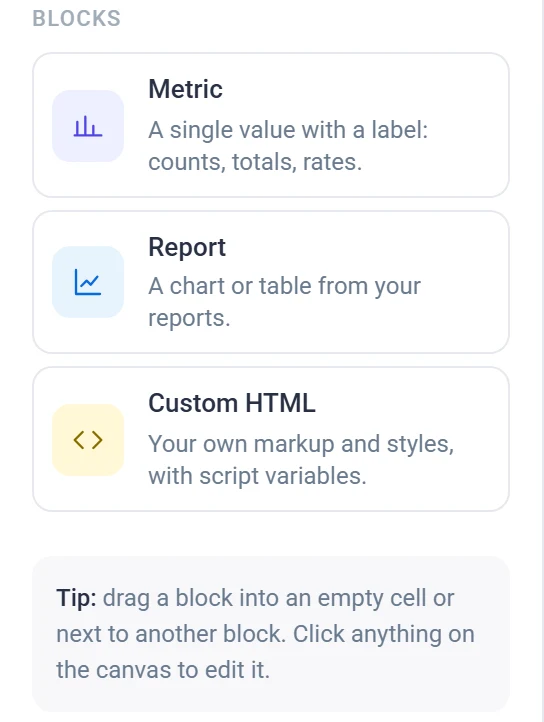
  • Custom HTMLYour own markup and styles, with script variables. A dashboard block, a component on a form or a record page, or a report layout.
  • Custom pagesA page from an HTML template with parameters, opened from a button on a record.
Designer · Dashboard builder · Blocks
The block palette of the Beezr dashboard builder: Metric, a single value with a label; Report, a chart or table from your reports; and Custom HTML, your own markup and styles with script variables.
  1. 1
    Metric

    A single value from a Smart Script, with a label.

  2. 2
    Report

    A chart or a table from your saved reports.

  3. 3
    Custom HTML

    Your own markup and styles, with script variables.

Let other systems call in

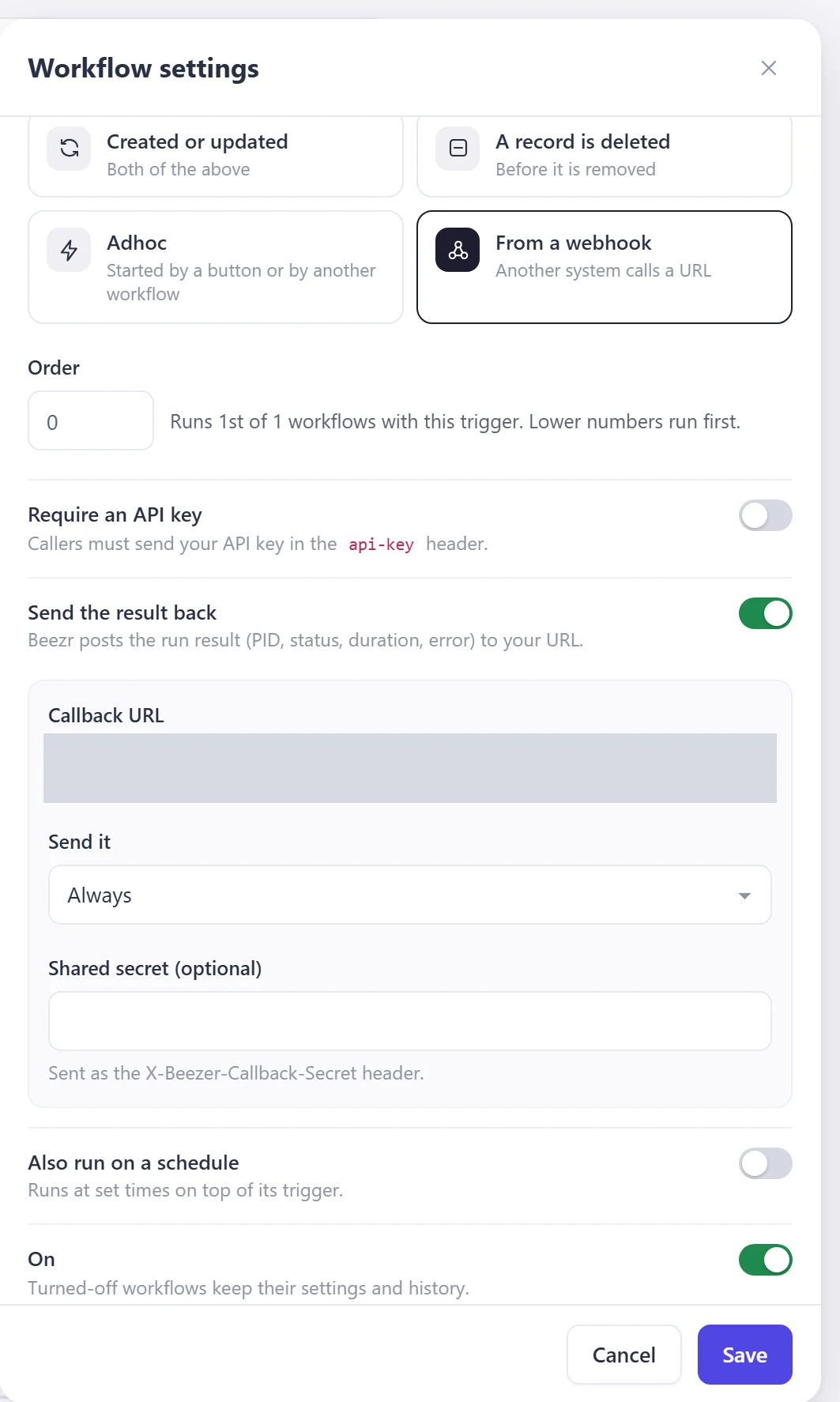
A workflow can start from a webhook. Another system calls its URL, Beezr answers straight away and runs the workflow, and can post the result to your URL when it ends. Give each system its own API key.

  • Webhook inBeezr answers 202 with a process id. The payload is stored before it answers and survives restarts. A start that fails is retried with backoff. Delivery is at least once, so build the workflow so a repeat is safe.
  • Result backWhen the run ends, Beezr posts the result to your URL: on success, on failure or always, with an optional shared secret.
  • Call outThe REST API step: GET, POST, PUT, PATCH or DELETE; optional authentication, basic, an API key in a header, query or cookie, or a bearer token; timeouts, retries with backoff and an idempotency key header.
Designer · API keys
The API keys page in the Beezr Designer. A short description, one active key shown with the name it uses in the activity log, icons to reveal, copy, edit, pause and delete it, and a New key button.
  1. 1
    One key per system

    Name each key after the system that uses it. Records it creates or changes show that name in the activity log.

  2. 2
    Pause or resume

    Pause a key to manage access for its system. Resume it any time to restore access.

  3. 3
    New key

    Make a key for each system, so you can pause one without breaking the others.

Designer · Workflow settings · Webhook
The Workflow settings panel in the Beezr Designer for a workflow started from a webhook. A trigger choice, From a webhook, an order, a Require an API key switch, a Send the result back switch with a callback URL, a Send it condition and an optional shared secret.
  1. 4
    From a webhook

    Another system calls a URL to start this workflow.

  2. 5
    Require an API key

    Secure the webhook with a key sent in the api-key header.

  3. 6
    Send the result back

    Beezr posts the run result (process id, status, duration, error) to your URL, on success, on failure or always.

  4. 7
    Shared secret

    Optional. Sent as the X-Beezer-Callback-Secret header, so you can check the call is ours.

Try it in the sandbox, then promote

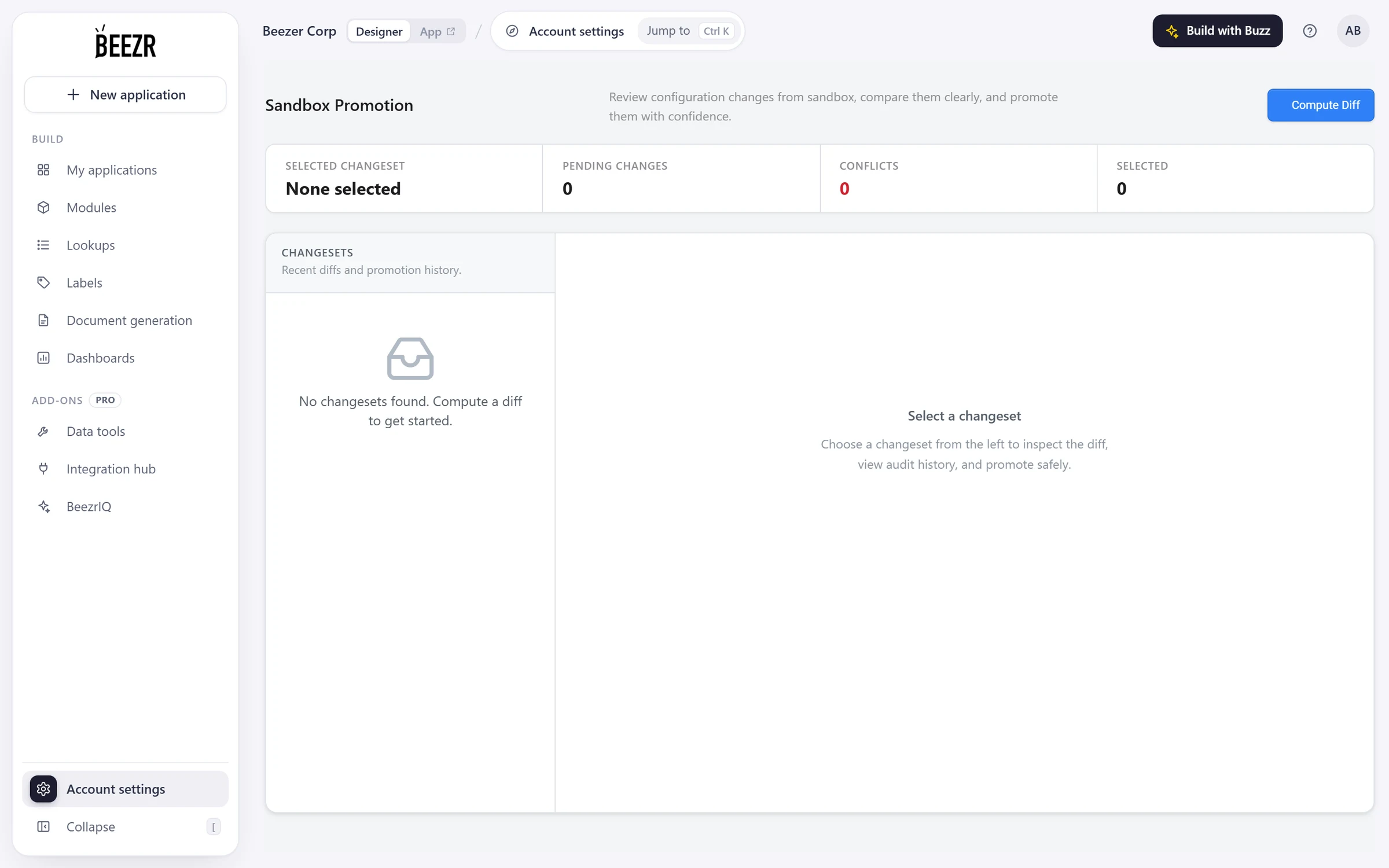
Switch the Designer into the sandbox from the top bar. Promote sandbox changes when you are ready to share them with your users. Compute a diff, choose what to send, and send it to production. A promotion can be rolled back.

  • ChangesetsEach diff is a changeset: open, promoted, rolled back or in conflict. Every item shows as added, modified or deleted, and you select the ones to promote.
  • SafetyItems that collide on a key are flagged as conflicts, and every promotion is logged.
  • WebhooksAdd ?env=sandbox to a webhook URL to reach the sandbox copy of a workflow.
Designer · Sandbox Promotion
The Sandbox Promotion page in the Beezr Designer, showing the initial changeset state. A Compute Diff button, counters for the selected changeset, pending changes, conflicts and selected items, and a list of changesets.
  1. 1
    Compute Diff

    Compares the sandbox with production and makes a changeset.

  2. 2
    Counters

    Pending changes, conflicts and how many items you have selected.

  3. 3
    Changesets

    Recent diffs and promotion history appear in this list.

Carried in a changeset

  • Modules
  • Fields
  • Lookup lists and their values
  • Forms
  • Workflows and their logic
  • Smart views

Watch a script opened in place

Select a card on the dashboard and its script opens in the side panel. Select another and its script opens instead.

Designer · Dashboard builder

How it connects

Code is an option in every other part, so it shows up wherever a rule is needed.

Workflows

A Custom function step runs your script between other steps, and conditions and mappings accept Smart Script.

Workflows and approvals
Integration

Webhooks and API keys let other systems call in. The REST API step, the Hub and Web Agents go out.

Integration
Data

Smart fields, default values and form rules are scripts on your own records.

Data and interfaces
Reports

Dashboard metrics and report columns can be Smart Script too.

Reports and dashboards

In a customer’s words

I started using Beezr for almost a year now, and I can describe it simply as the “Ultimate Grand Workshop of computerizing” anything there can be automated and computerized. There are tools in every corner of it allowing you to create whatever you need to do, at any level of simplicity or sophistication. Thank you guys, and really appreciate your quality work.

Photo of Ossama FattalOssama FattalCEO & Founder

Questions people ask

What language is Smart Script?

JavaScript, at the ECMAScript 5.1 level, running on the Nashorn engine. Use var and function. Scripts call FunctionManager to read and write your records.

Where can I write it?

On records: smart fields, default values, form rules and edit and delete conditions. On screens: button visibility, dashboard metrics, report columns and filters, document templates. In workflows: decision conditions, record manager mappings, Smart Routing, REST step URLs and bodies, and the Custom function step.

Can I try a script before it goes live?

On a dashboard metric, Run test runs the script and shows what it returned or the error. For configuration, work in the sandbox and promote when you are ready.

Can other systems call Beezr?

Yes. A workflow can start from a webhook, optionally protected by an API key sent in the api-key header, and can post its result to your URL when it ends. Each system gets its own API key, which you can pause without touching the others.

What if a webhook is delivered twice?

Delivery is at least once. The payload is stored before Beezr answers 202, and a start that fails is retried, so the same event can arrive more than once. Build the receiving workflow so a repeat is safe.

Can I build my own components?

Yes. Custom HTML blocks take your own markup and styles, with script variables, on dashboards, on forms and record pages, and in report layouts. A Custom page renders an HTML template with parameters, opened from a button.

Where is the documentation?

The Designer documentation is linked from Resources in the main menu.

Start with the problem in front of you.

Show us the process you are trying to improve. We will tell you whether Beezr looks like a fit and how we would approach it.

Next on the tour

Next: Overview

The parts every business application needs, working together.

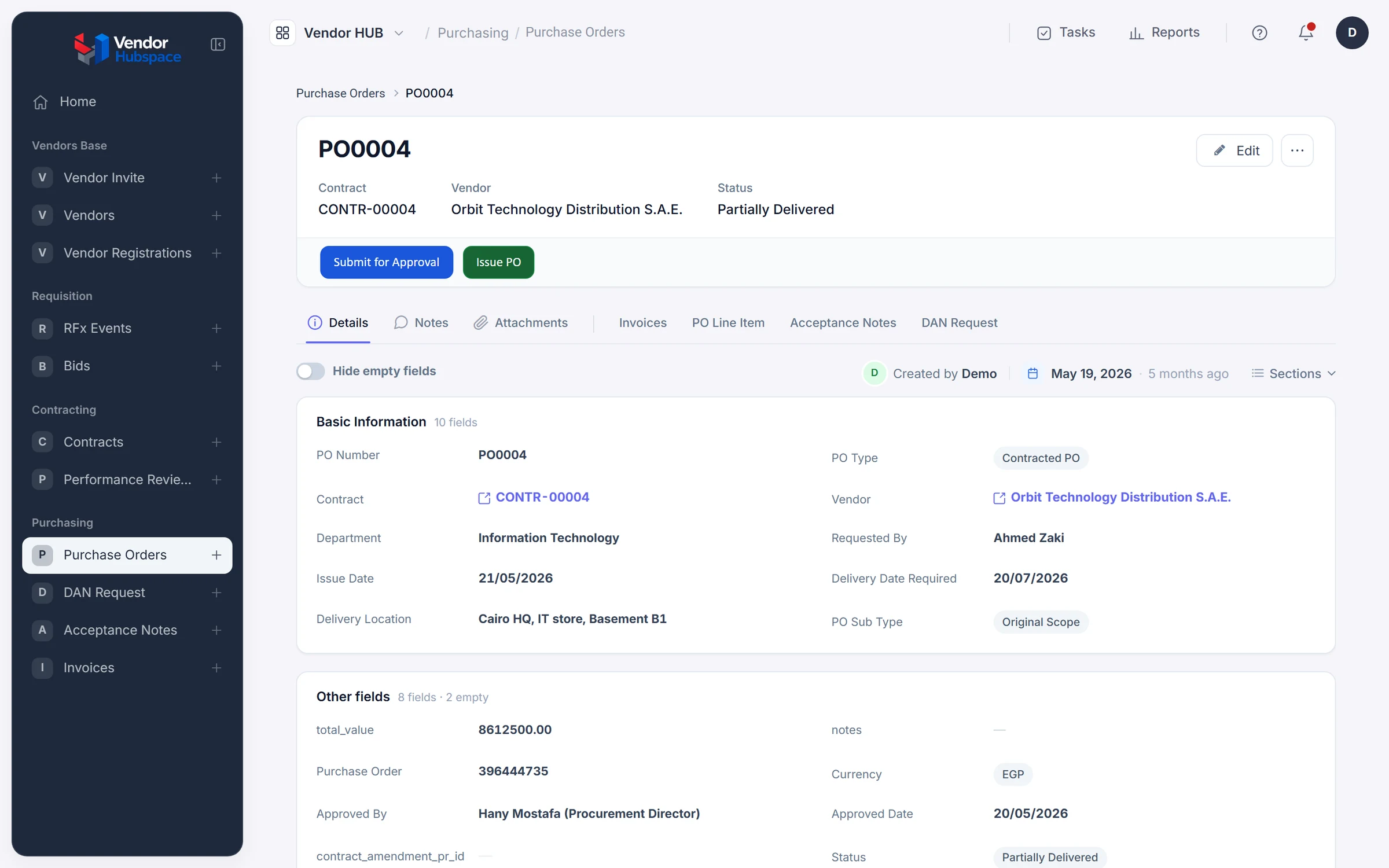
The PO0004 purchase order in the Vendor HUB application, built on Beezr.