Skip to content

AI in workflows

Put AI to work inside the processes you already run.

In Beezr, AI is a step in a workflow. It reads a document, a web page or your own records, answers in exactly the shape your process needs, and hands the result to the next step, where your checks, approvals and permissions still apply.

Designer · Workflow · AI agent step
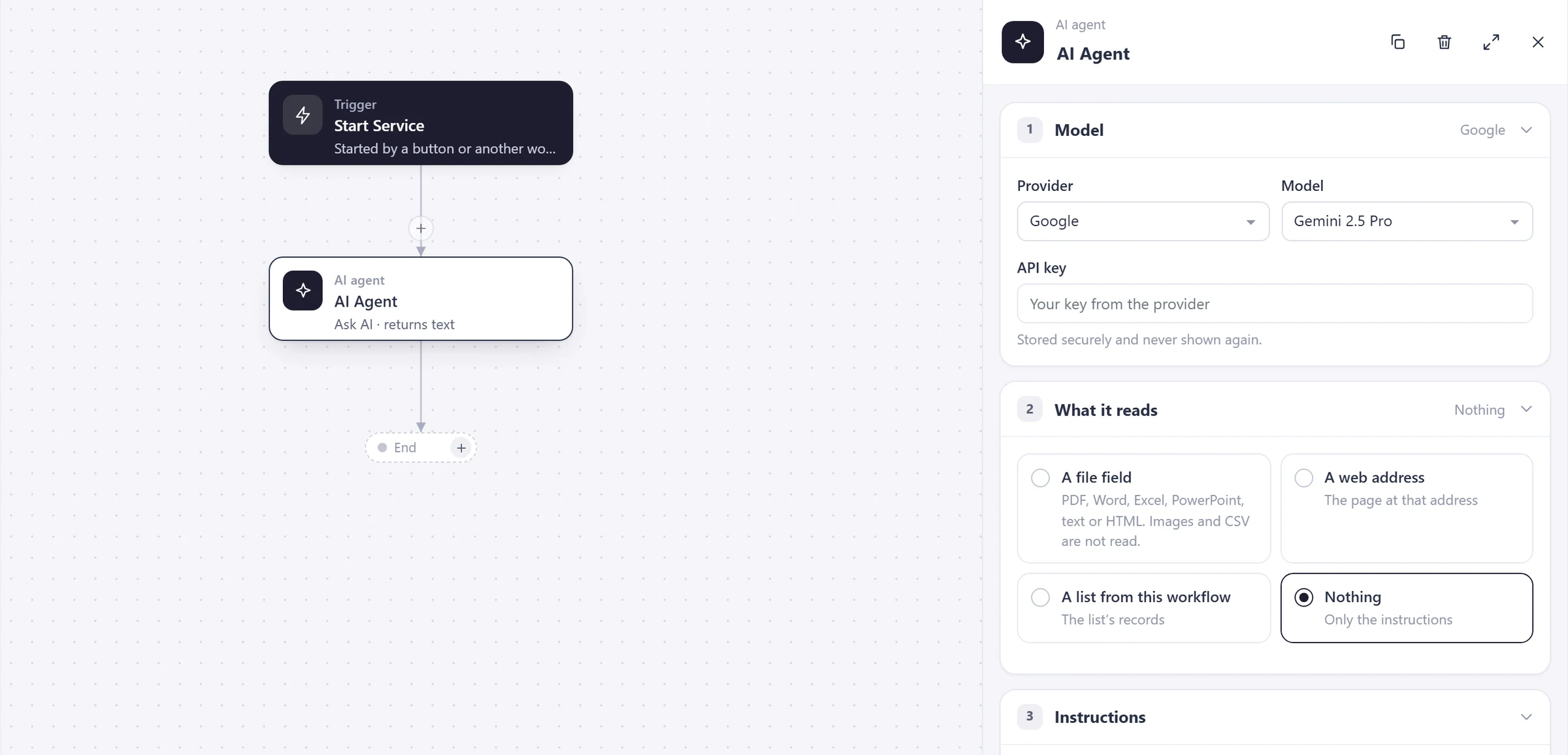
The AI agent step in the Beezr workflow designer. The canvas shows a trigger, then the AI agent step, then an end. The step panel lists three numbered sections: Model, with the provider Google and a model, and an API key field that is stored securely; What it reads, with a file field, a web address, a list from this workflow or nothing; and Instructions.
  1. 1
    Model

    Choose the provider and the model, and use your own API key.

  2. 2
    What it reads

    A file field, a web address, a list from this workflow, or nothing at all.

  3. 3
    Instructions

    What to do with it, as plain text or as a Smart Script that can use your records.

A step like any other

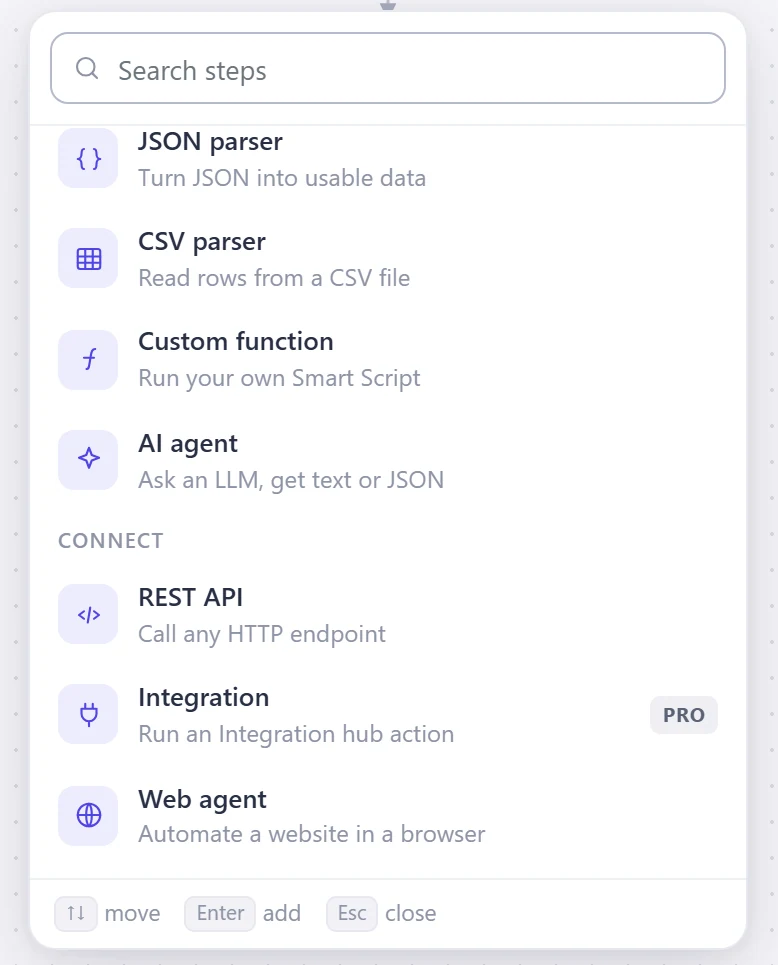
On the workflow canvas you press + on a line and pick a step. AI agent sits in the Data group with the JSON parser, the CSV parser and the custom function. Put it where the process needs it: after a trigger, after a Load data step, before an approval. The decisions, loops and approvals around it work as they always do.

  • WherePress + on any line of the canvas.
  • GroupData, beside the parsers and the custom function.
  • In the pickerAsk an LLM, get text or JSON.
Designer · Workflow · Add a step
The add-a-step picker in the Beezr workflow designer. Under Data it lists JSON parser, CSV parser, Custom function and AI agent, described as Ask an LLM, get text or JSON. Under Connect it lists REST API, Integration and Web agent.

Five parts, top to bottom

Open an AI step and its panel has numbered sections. You choose a model, say what it reads, write the instructions, define the shape of the answer and name the result. The callouts below use the panel’s own numbers. Everything after that is an ordinary workflow.

Designer · AI agent · Settings
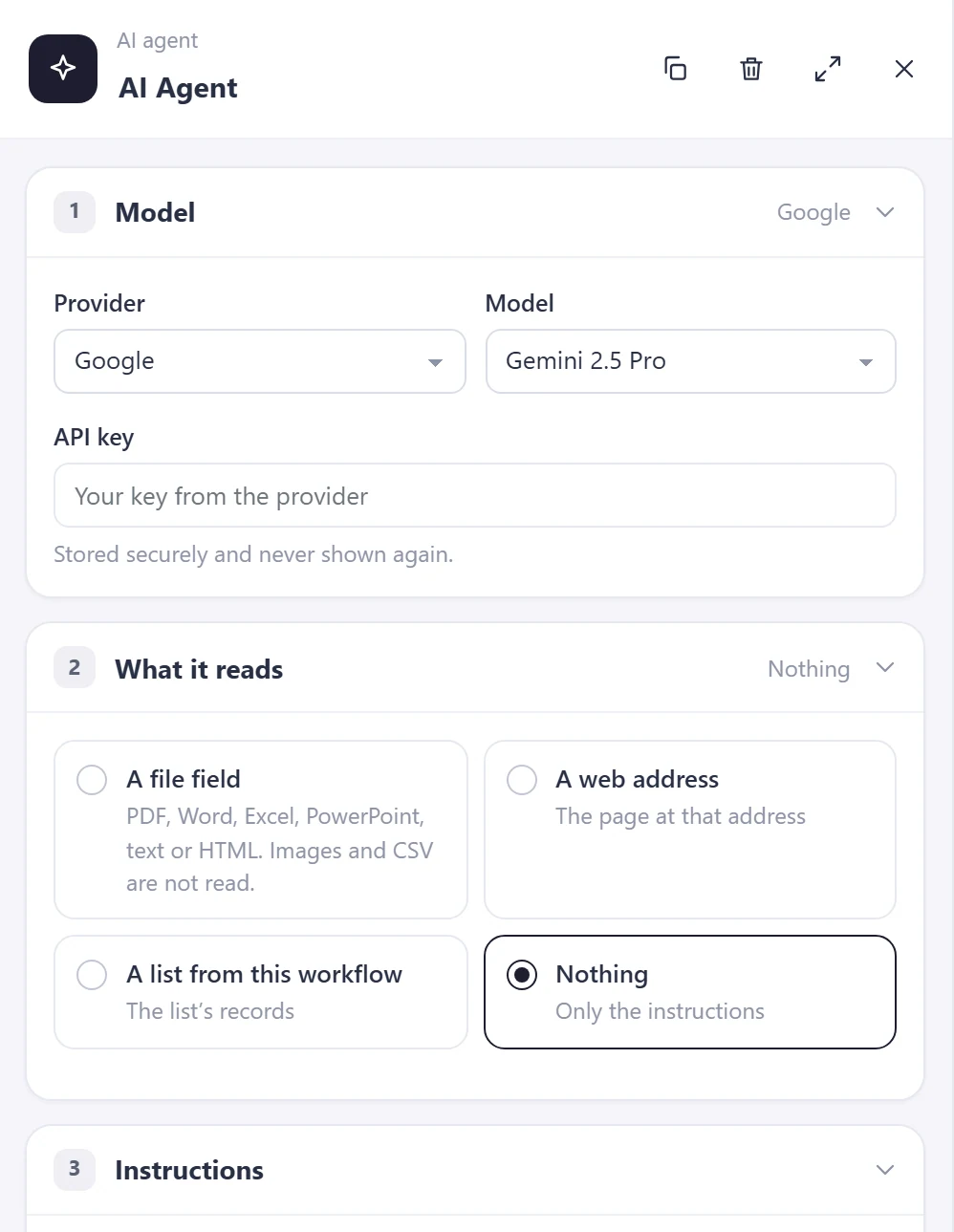
The AI agent step panel in the Beezr Designer with sections 1 Model, 2 What it reads and 3 Instructions. Model shows the provider Google, a model and an API key field with the note Saved key stays hidden. What it reads offers a file field, a web address, a list from this workflow or nothing.
Designer · AI agent · Answer
AI agentAI Agent
4It answers with4 fields
TextYes or noA numberFields, objects and lists
FieldsPaste a sample
order_linesList of objects×
Object×
product_idNumber×
quantityNumber×
unit_priceNumber×
+ Add a field inside
+ Add a field

The model is told to answer in exactly this shape.

5Result
order_result

✓ Unique in this workflow. Use letters, numbers and _.

Recreated from the Designer for clarity. The field names are an example.
  1. 1
    Model

    Provider, model and your API key.

  2. 2
    What it reads

    A content field, such as an attached PDF, a web address, a list from this workflow, or nothing.

  3. 3
    Instructions

    What to look for and what to do with it. Plain text, or a Smart Script that can load your own records first.

  4. 4
    It answers with

    Text, yes or no, a number, or fields, objects and lists. The model is told to answer in exactly this shape.

  5. 5
    Result

    The answer gets a name. Later steps use it, and a list in it can be looped over.

Your model, your key

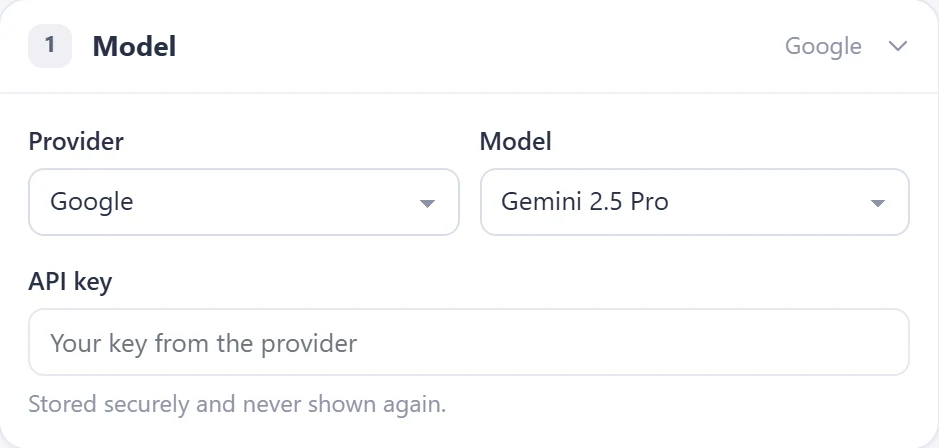
Each AI step has its own provider, model and API key: OpenAI, Anthropic, Google or OpenRouter, which takes any model id you type. You bring the key and Beezr stores it securely. When a better model comes along, change the provider and model on the step.

  • ProvidersOpenAI, Anthropic, Google and OpenRouter.
  • Your keyYour own account with the provider.
  • Saved keyStored securely. Leave it empty to keep it.
Designer · AI agent · Model
The Model section of the AI agent step: provider Google, model Gemini 2.5 Pro, an API key field that reads Your key from the provider, and the note Saved key stays hidden.
  1. 1
    Provider and model

    Pick OpenAI, Anthropic, Google or OpenRouter, then the model. OpenRouter takes any model id you type.

  2. 2
    Your API key

    The step uses your own account with the provider.

  3. 3
    Stored securely

    The saved key stays hidden. Leave the field empty to keep it, or type to replace it.

Instructions that use live business data

Instructions can be plain text or a Smart Script, with an Insert data button and a list of functions. So a step can load your own records before it asks the model anything. Here a Load data step puts the product list into the workflow, and the instructions read it, so the model matches each line of an order to a product you actually sell.

  • LoadsA Load data step collects records into a named list.
  • ReadsThe instructions call getListFromContext to use that list.
  • ThenA custom function can act on the answer.
Load dataListLoad Products as productList
AI agentAI AgentAsk AI · returns structured data
3Instructions
1(function () {
2  var products =
3    FunctionManager.getListFromContext("productList");
4  var names = [];
5  for (var i = 0; i < products.size(); i++) {
6    var f = products.get(i).getFieldValueMap();
7    names.push(f.get("name").getCurrentValue());
8  }
9  return "Match each order line to one of: "
10    + names.join(", ");
11})();
{ } Insert data<> FunctionsTextSmart Script
Recreated from the Designer for clarity. The script is an example.

A person stays in charge

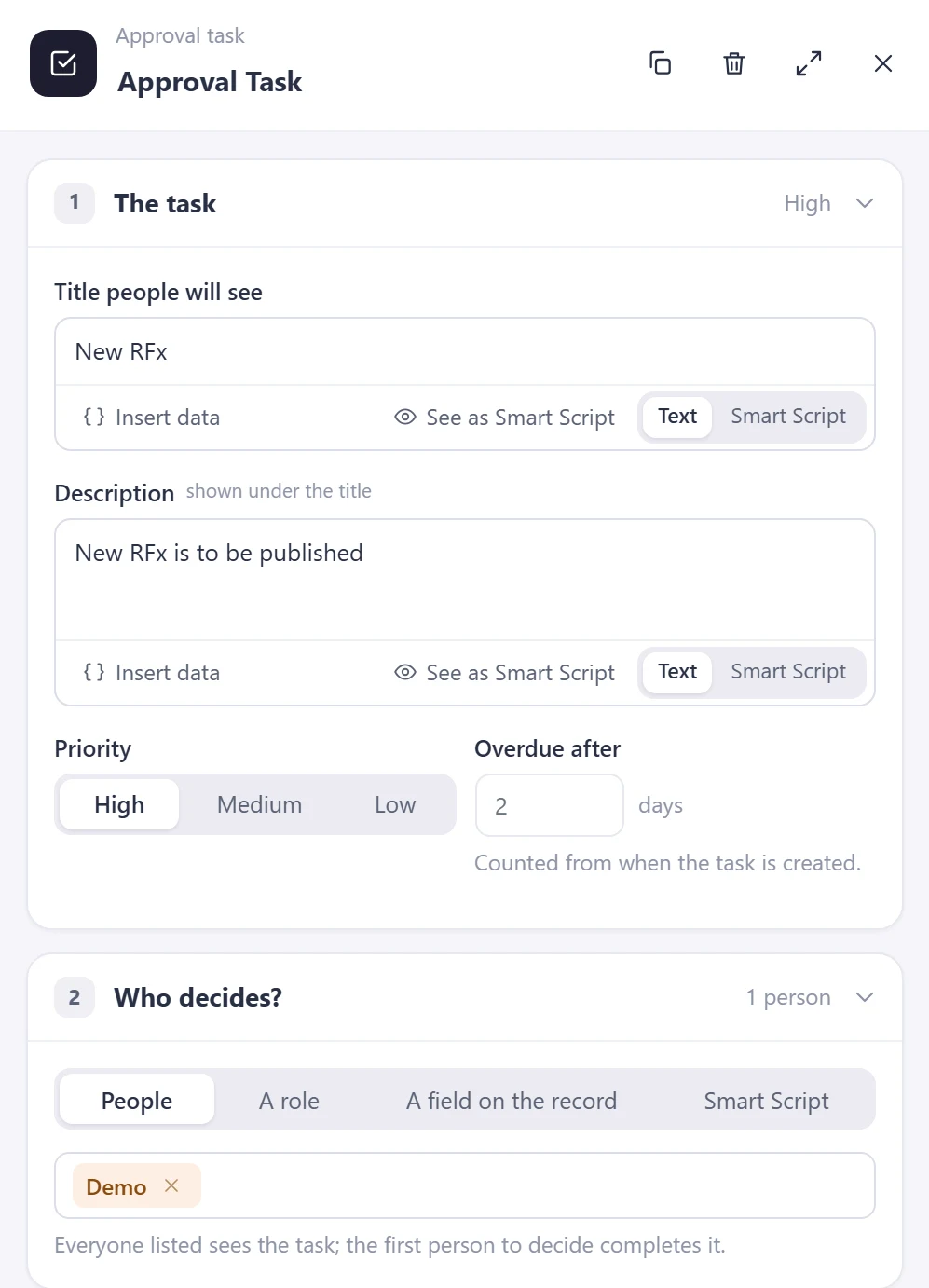
An AI step returns an answer. What happens next is whatever you drew: put an approval task after it and the workflow waits until a person approves or rejects. It is the same approval task used everywhere else in Beezr, so the answer meets your checks before it reaches anyone.

  • Who decidesPeople, a role, a field on the record or a Smart Script.
  • How soonPriority, and an overdue-after setting in days.
  • OutcomesApproved and rejected are separate branches.

Illustration of a Beezr workflow.

Designer · Approval task
The Approval task panel in the Beezr workflow designer. The task has a title and description, a High, Medium or Low priority, and an overdue-after setting in days. Who decides? offers People, A role, A field on the record or Smart Script.
The real approval task panel

Eight things it can do

Pick one to see what the step reads, what it answers with and what happens next. These are ideas to start from, built with the same step. The values in the illustrations are examples.

What it reads
Purchase order · PDF
AI agent
OpenAIyour key
The answer
order_resultList of lines
productqtyprice
Oat drink 1L12018.50
Barista oat6021.00
Almond 1L4822.00
Then
Create recordsSales order lines
What it reads
Contract · PDF
AI agent
Anthropicyour key
The answer
contract_reviewFields + yes/no
valueEGP 5,880,000
start01 Jan 2027
end31 Dec 2027
renewalAuto, 12 months
penaltyYes
Unusual penalty clause
Then
FlaggedLegal review
Not flaggedContinue
What it reads
Resume · Word
AI agent
Googleyour key
The answer
resume_matchFields + score
roleProcurement analyst
years7
skillsSourcingERPExcel
match86 / 100
Then
Score ≥ 80Shortlist
Below 80Recruiter review
What it reads
Proforma · PDF
AI agent
OpenRouteryour key
The answer
proforma_checkList of lines
itemPOquote
Oat drink18.5018.50
Barista oat21.0023.40
Almond 1L22.0022.00
Then
Price differsException → Approval
MatchesContinue
What it reads
Registration + ID · PDF
Registration
ID document
AI agent
OpenAIyour key
The answer
docs_checkFields + yes/no
companyExample Trading
registrationCR-•••• 214
id documentReceived
Missing: Tax card
Then
RequestMissing document
What it reads
Request · text
Can’t sign in to the supplier portal after the password reset. Need access today, an audit is on Friday.
AI agent
Anthropicyour key
The answer
triage_resultFields
categoryAccess
priorityHigh
teamIT support
Then
Assign teamIT support
What it reads
tenders.example/open
AI agent
Googleyour key
The answer
tender_watchList of lines
Packaging supply
new · open tender
18 Nov
Cold-chain freight
new · open tender
02 Dec
Then
DraftRFx event for review
What it reads
Open invoices · list
no.amountlate
104341,20014d
10519,8006d
105822,1503d
10625,4001d
AI agent
OpenRouteryour key
The answer
followup_draftText
Hi, invoice 1043 (EGP 41,200) is 14 days overdue. Could you confirm a payment date?
Suggested next step: call on Thursday.
Then
ApprovalAgent approves before sending

Your checks, approvals and permissions still apply.

Illustrations of the AI agent step. Values are examples.

How it connects

The AI step reads workflow inputs and hands its answer to the steps you choose.

Workflows

AI is a step on the canvas, next to triggers, decisions, loops and approvals.

Workflows and approvals
Data

The step can read a file field on a record, or a list loaded from your records. A later step writes the answer back to a record.

Data and interfaces
Integration

A step can read a web address directly. For images and scanned documents, the Integration Hub has document-reading connectors such as Amazon Textract, Google Cloud Vision and Mistral OCR.

Integration
Security

An approval task after the AI step is how a person signs off. Permission profiles keep deciding who can see the records that result.

Security and governance

In a customer’s words

Beezr’s easy to drag and drop tools are built to customize and automate the processes in few clicks. Beezr’s SaaS model is recommended for anyone looking for cost effective, efficient, and productive workflows that can be amazingly quick to implement in real time.

Photo of Rekha SetpalRekha SetpalHead of in5 Program

Questions people ask

Which AI providers and models can I use?

OpenAI, Anthropic, Google and OpenRouter. You choose the provider and model on each AI step, and with OpenRouter you can type any model id it offers.

Do I need my own API key?

Yes. Each AI step uses a key from the provider you chose. The saved key stays hidden. Leave the field empty to keep the saved key, or type to replace it.

What can the AI step read?

A file field on a record (PDF, Word, Excel, PowerPoint, text or HTML), a web address, a list from the same workflow, or nothing, in which case it works from the instructions alone.

What does it return?

Text, a yes or no, a number, or structured data made of fields, objects and lists. The model is told to answer in exactly the shape you define, and the answer is saved under a name that later steps use. A list in the answer can be looped over.

How do I use the AI answer in the workflow?

The AI step returns an answer. The next step is one you drew: a record update, an email, or an approval task that waits for a person to approve or reject.

Does my data go to the AI provider?

Yes. The step sends its instructions and what it reads to the provider you chose, using your own account and key. Choose a provider whose terms fit the data you give it.

Can the instructions use my own records?

Yes. Instructions can be plain text or a Smart Script, with an Insert data button and a list of functions. A Load data step can put records into the workflow first, and the instructions can read them.

What is it good for?

Reading a document, a page or a list and returning something structured: order lines from a purchase order, terms from a contract, a score for a resume, a category for a request. The eight examples on this page show the shape. Each one runs inside a workflow, with your own checks around it.

Start with the problem in front of you.

Show us the process you are trying to improve. We will tell you whether Beezr looks like a fit and how we would approach it.

Next on the tour

Next: For developers

Smart Script and the code behind the visual tools.

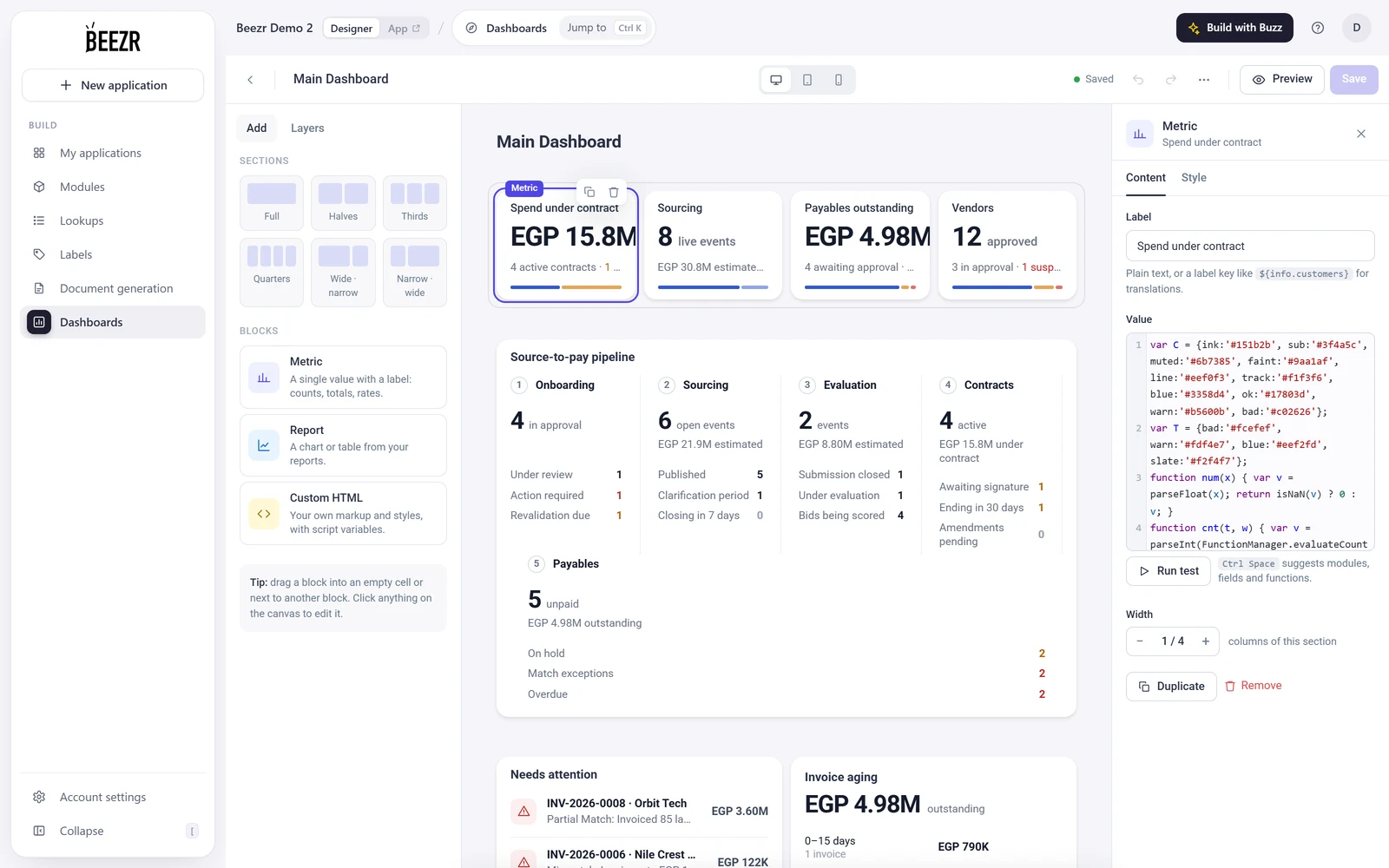
The Beezr dashboard builder with the Spend under contract card selected and its Smart Script editor open.